
Healthcare · Software
Lab Management System
Pick up the doctor’s test request, read the result off the analyzer as data, and send the finished report back to the hospital without retyping a number.

Inside the product
Real screens
Shown on demo data. Click any screen to see it full size.
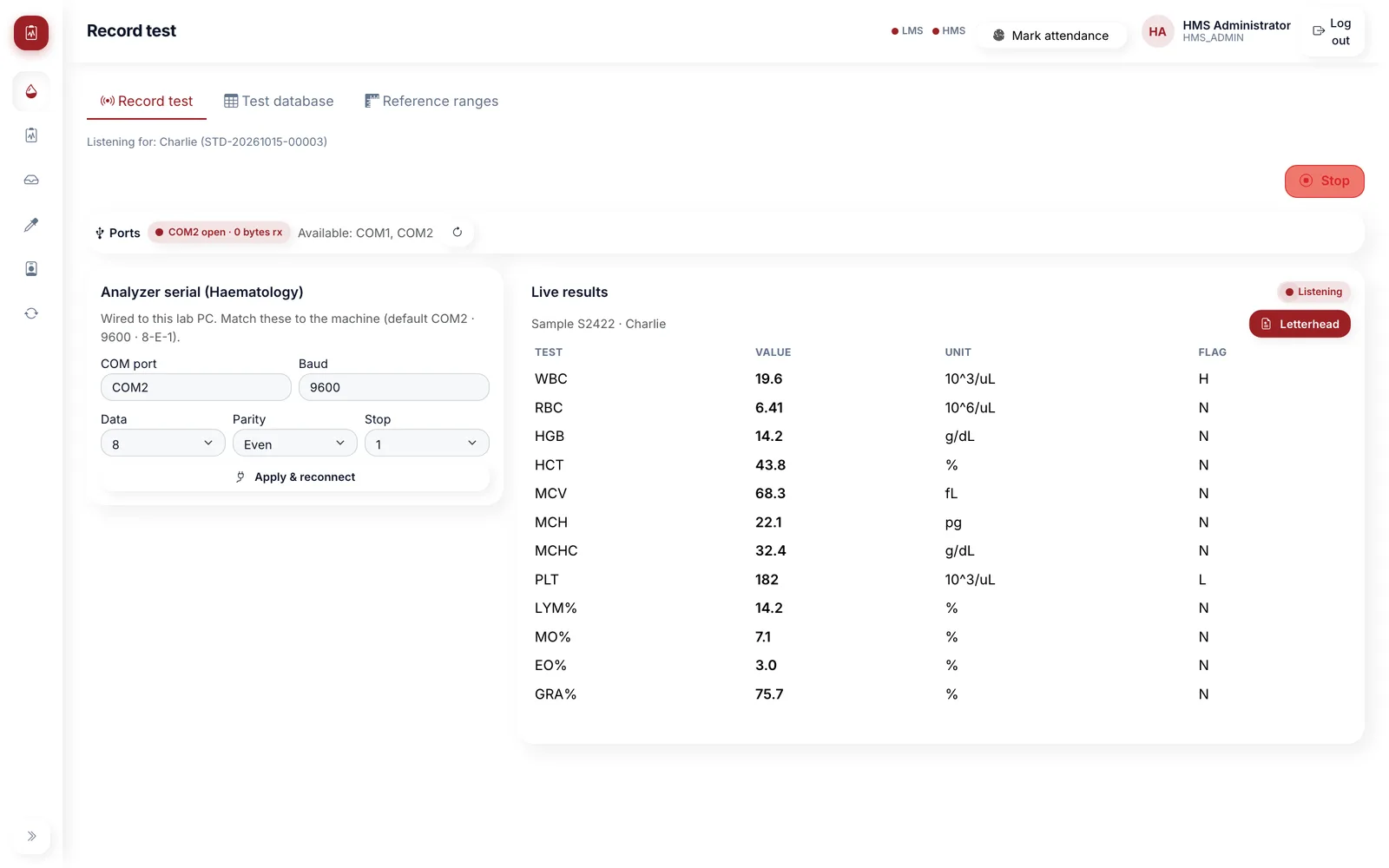
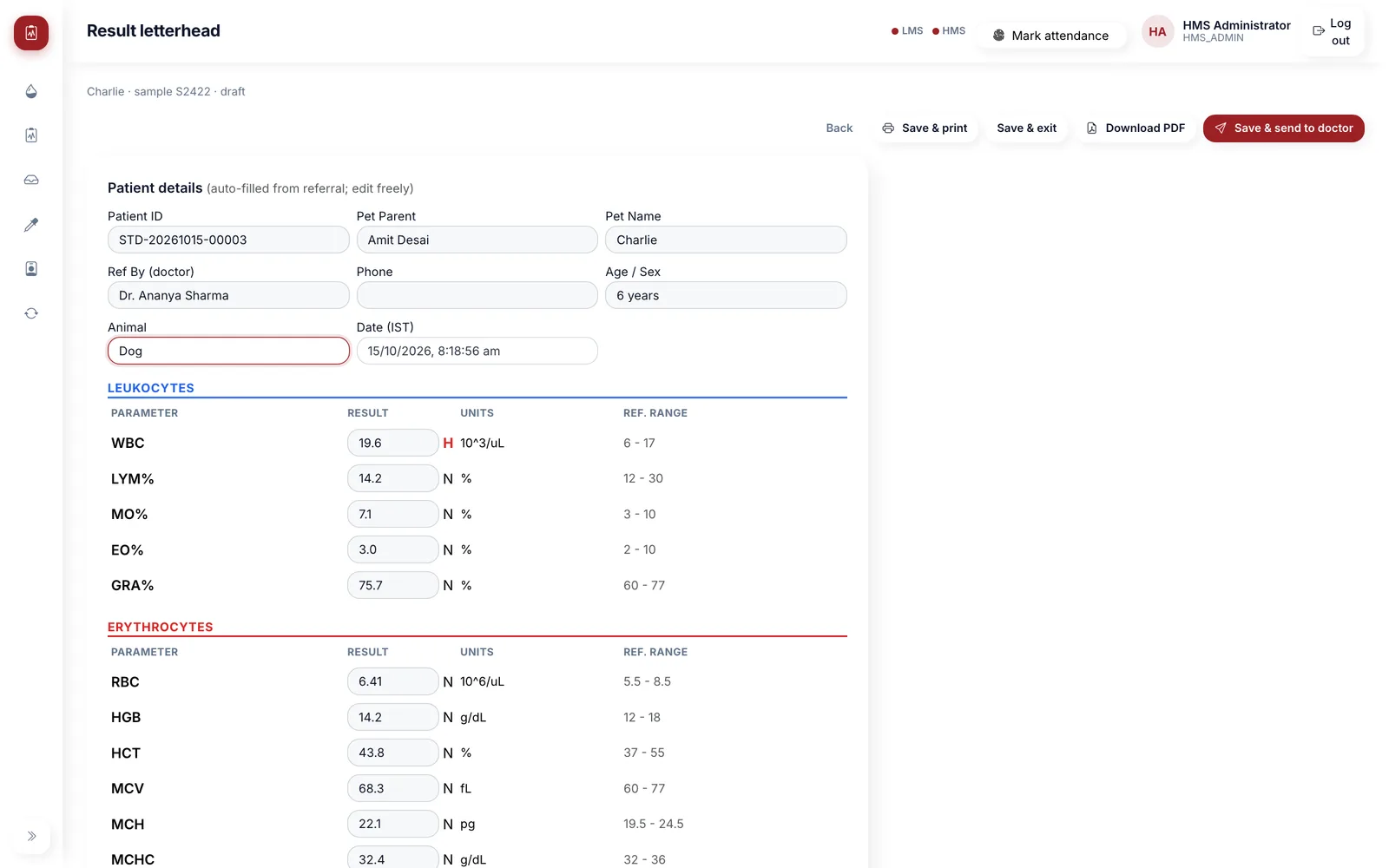
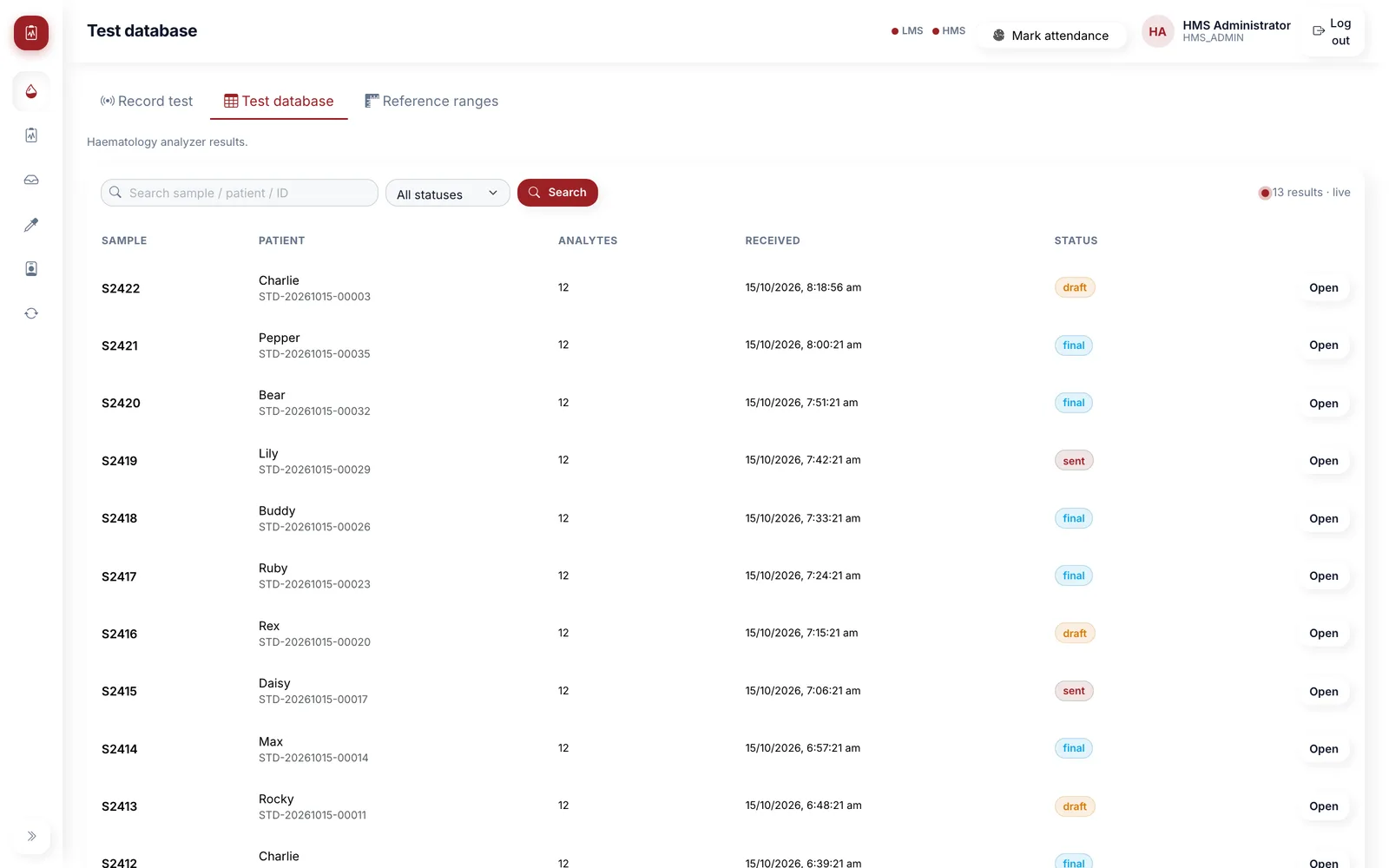
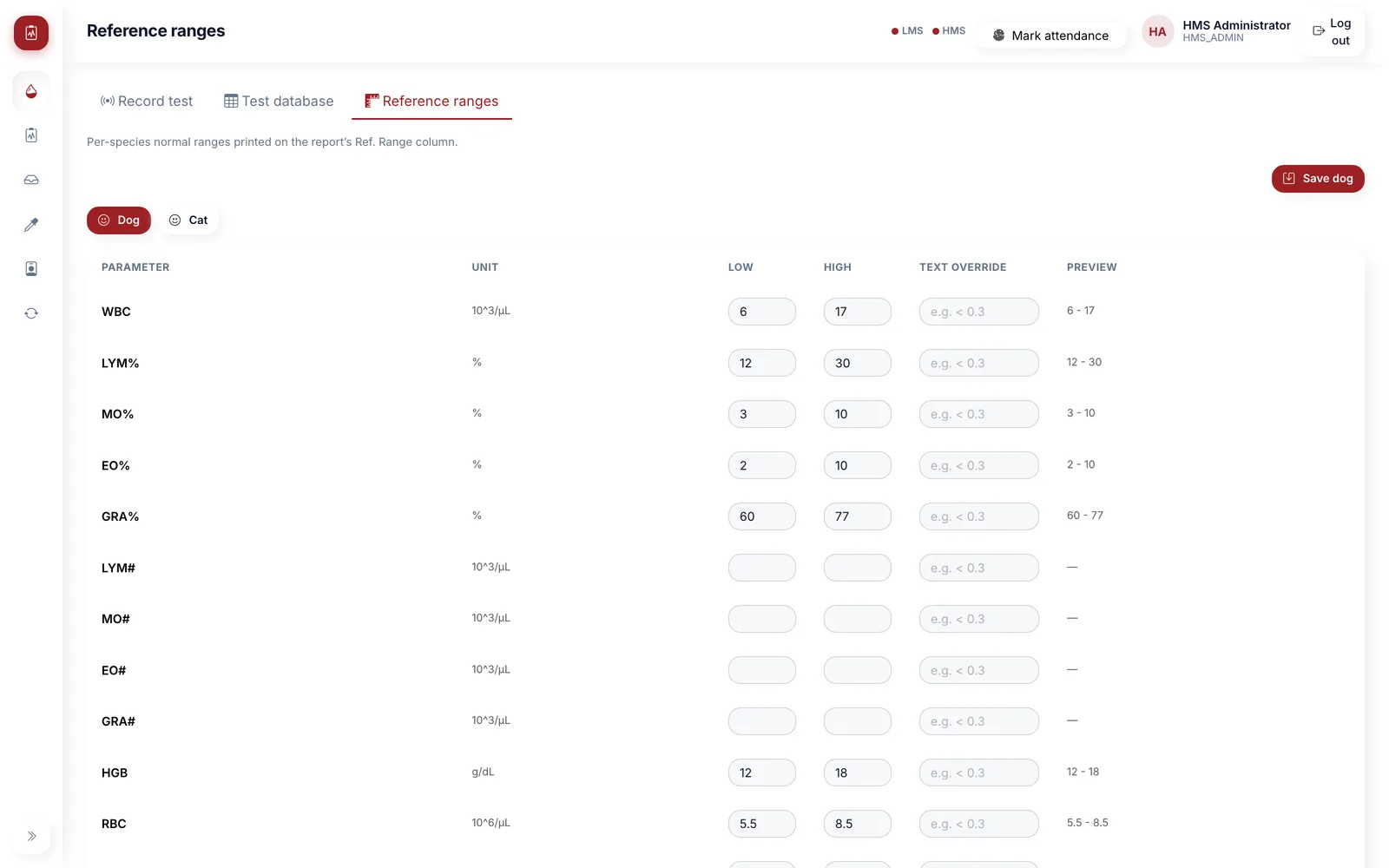
S-Tech LMS is the lab workstation for hospitals running S-Tech HMS. It runs on the lab PC that the analyzer is wired to. Test requests from doctors, bookings and walk-ins appear in a pending list; the technician picks the machine, the app listens on the serial port, and the result arrives on screen as soon as the analyzer sends it. The technician checks the values against the reference ranges, edits the report if needed and sends it to the doctor, which completes the referral in HMS and closes its bill. Staff log in with their HMS accounts, and reference ranges are kept per species for veterinary labs.
Why this exists
What it fixes
These are the problems clients describe to us before they buy. If none of them sounds like your week, this may not be the right product — tell us and we will point you at a better one.
What we hear
Results are read off the analyzer printout and typed into a report by hand, which is slow and is where transcription errors come from.
Test requests reach the lab on paper slips, so the lab cannot see what is pending or who asked for it.
Finished reports go back to the doctor on paper or WhatsApp, and the test charge on the patient’s bill is closed separately, if at all.
Reference ranges live in a Word template that differs from machine to machine and drifts out of date.
What is inside
10 modules
Every deployment turns on the modules you need. Nothing here is a separate purchase unless the plan says so.
Pending tests from HMS
Lab referrals from doctors, bookings and walk-ins with patient, owner, age, required tests, doctor, remark and history. The list refreshes on its own every few seconds.
Serial analyzer capture
The app opens the RS-232 port on the lab PC, handles the ASTM E1381 handshake and reassembles the message. COM port, baud, data bits, parity and stop bits are set on screen and remembered.
Live result binding
Start listening for a referral or a walk-in, and the next result from the analyzer is attached to that patient and appears on screen live.
More than one analyzer
Haematology over serial, plus interfaces for a biochemistry analyzer and a second blood analyzer that send ASTM or HL7 over the network, or PDF reports that are read automatically.
Result report
Values grouped into sections with units, H and L flags and the reference range for the species. Patient fields fill from the referral and can be edited before the report is saved.
Send to doctor
Save and send uploads the report to HMS, which marks the referral completed, notifies the referring doctor and closes the test bill. Reports can also be printed or saved as PDF.
Test database
Every captured result, searchable by sample, patient or patient ID and filtered by status and date. Each result moves from draft to final to sent.
Reference ranges
Normal ranges per species and per parameter, as low and high values or a text override such as < 0.3. A range sent by the analyzer takes priority.
HMS login & permissions
Lab staff sign in with their HMS accounts. Login is only enabled when both the lab server and the hospital server are reachable, and lab access is controlled by HMS permissions.
Staff & my HR
Lab staff administration and a self-service tab for attendance and payslips, using the same records as HMS.
Deployment
Cloud, your server, or no internet at all
The same software either way. This is a deployment choice, not a different edition with fewer features.
Self-hosted
On your own server, inside your building. You own the database.
Fully offline
Runs on a local network with no internet at all, and syncs when one returns.
Runs on
- Windows lab workstation
- Local server on Windows
Integrates with
- S-Tech HMS (login, referrals, report upload, bill closure)
- Haematology analyzers over RS-232 (ASTM E1381 / E1394)
- Biochemistry analyzers over the network (ASTM / HL7)
- PDF result reading for analyzers without a data feed
Who it is for
- In-house labs of hospitals running S-Tech HMS
- Veterinary hospital labs
- Labs with a haematology analyzer wired to a PC
How it is sold
Plan tiers
Actual pricing depends on modules, users, sites and whether you host it yourself, so it is quoted. These tiers tell you where you would sit.
Single analyzer
Pending tests, serial capture for one haematology analyzer, reports, test database and reference ranges.
Get a priceMulti-analyzer
Everything in Single analyzer plus network and PDF interfaces for biochemistry and a second blood analyzer.
Get a priceEvery S-Tech product
The same nine promises, on all 22 products
These are not per-product features. They apply to everything we build, and they are the reason our software works on sites where other systems do not.
RFID-first
Every product is built around RFID speed and modern technology from the start, not bolted on afterwards.
Any RFID hardware
Ready to configure with any make of RFID hardware. Barcode, QR code and traditional manual methods work by default.
Runs anywhere
Web, Windows, macOS, Linux, Ubuntu, Unix and Android. Your team uses the machine it already has.
Online or offline
Works fully online in the cloud, or fully offline on a local server, and syncs when a connection returns.
Self-hosted option
Host it on your own server and keep the data inside your building. No dependence on our infrastructure.
White-label
Available under your own brand — logo, colours, product name and domain.
Customisable
Every deployment is unique. Modules, fields, forms, reports and workflows are changed to fit your process.
Performance & reliability
Built for speed and uptime under real load, on real hardware, in places with unreliable power and network.
Secure by design
Encrypted data, role-based access, full audit trail and scheduled backups. You own the data.
A note on wording: where we say "fully offline" we mean the system runs on a local server on your own network with no internet connection, and syncs when one returns. Where we say "secure" we mean encrypted data, role-based access, a full audit trail and backups you control. We would rather be specific than round it up to 100%.
Questions
Before you ask us
The things buyers actually check. If your question is not here, ask it — we answer honestly, including when the answer is no.
Which analyzers can it read?
Haematology analyzers that send ASTM over RS-232 are read directly by the lab PC. Network analyzers that send ASTM or HL7, and analyzers that only produce PDF reports, are read through separate interface services. We confirm the make and model during discovery.
Does it need S-Tech HMS?
Yes. Logins, test requests, patient details and report delivery all come from HMS. The LMS server runs next to the HMS server and uses the same database.
What happens to the bill?
When the report is sent to the doctor, HMS marks the referral completed and closes the diagnostic bill for that test.
Does it handle veterinary labs?
Yes. Reports carry the pet and owner details, and reference ranges are kept separately for dogs and cats.
Related products and solutions
Software
Hospital Management System
Human and veterinary hospital software, from the front desk to discharge
Read moreSoftware
Pharmacy Management System
Counter billing, batch stock and cash that match the shelf
Read moreSolution
Laboratory & Diagnostics
Samples that can always be located, results that arrive as data, and turnaround time you can actually measure.
Read moreSolution
Healthcare Systems
One patient record across the hospital, identity confirmed at every step, and equipment that can be found.
Read moreSee LMS on your own data
A demo runs on your process, not a canned dataset. Bring a real scenario and we will show you how it handles it — including the parts it does not.
Or call +91 97305 32888 — Monday to Saturday, 9:30 am to 6:30 pm.