
Logistics & Warehouse · Software
Returnable Pallet & Asset Tracker
Put one UHF tag on each returnable pallet, crate or bin, let a fixed reader at the dock count every truck, and always know which customer is holding how many — and for how long.
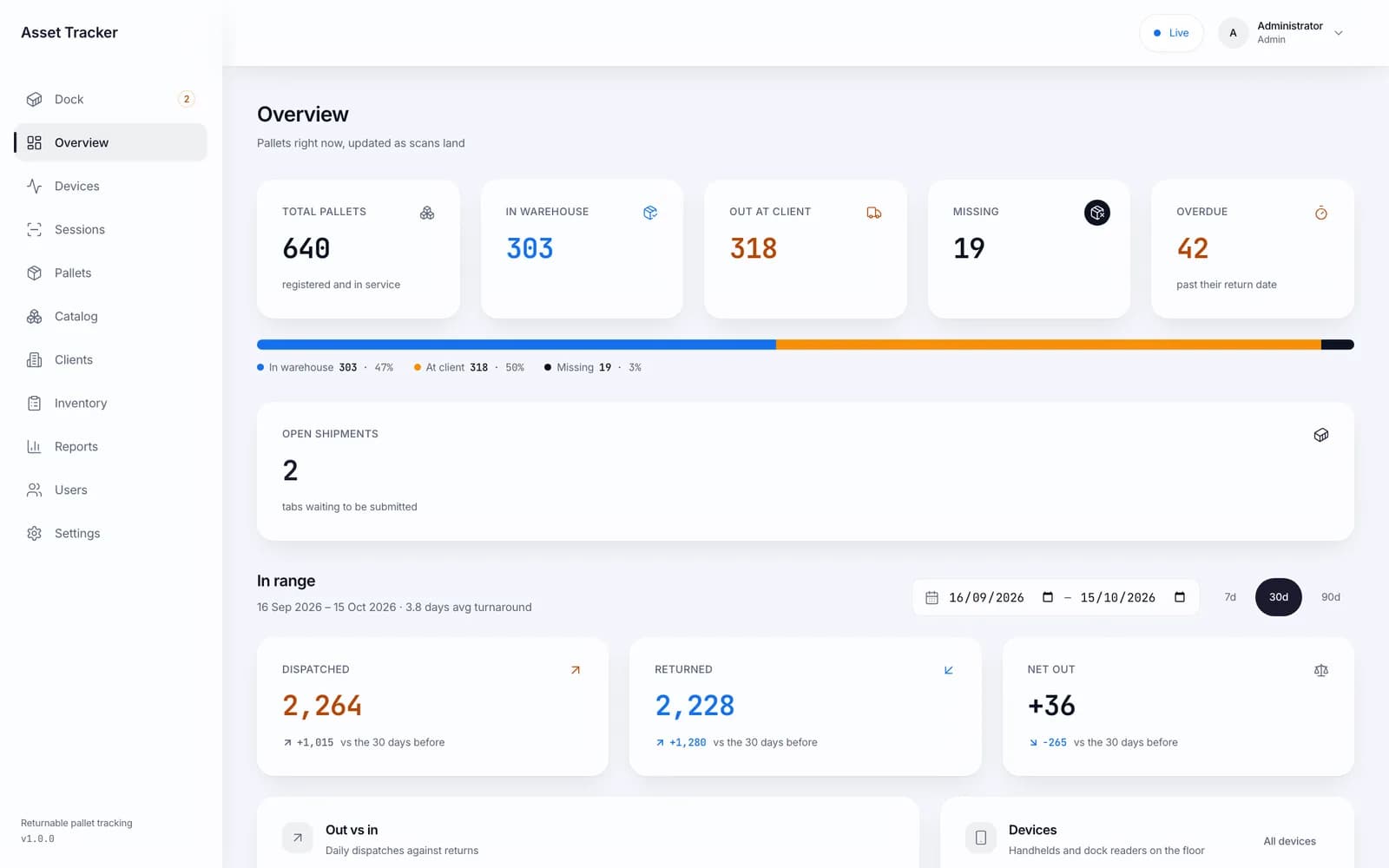
Inside the product
Real screens
Shown on demo data. Click any screen to see it full size.
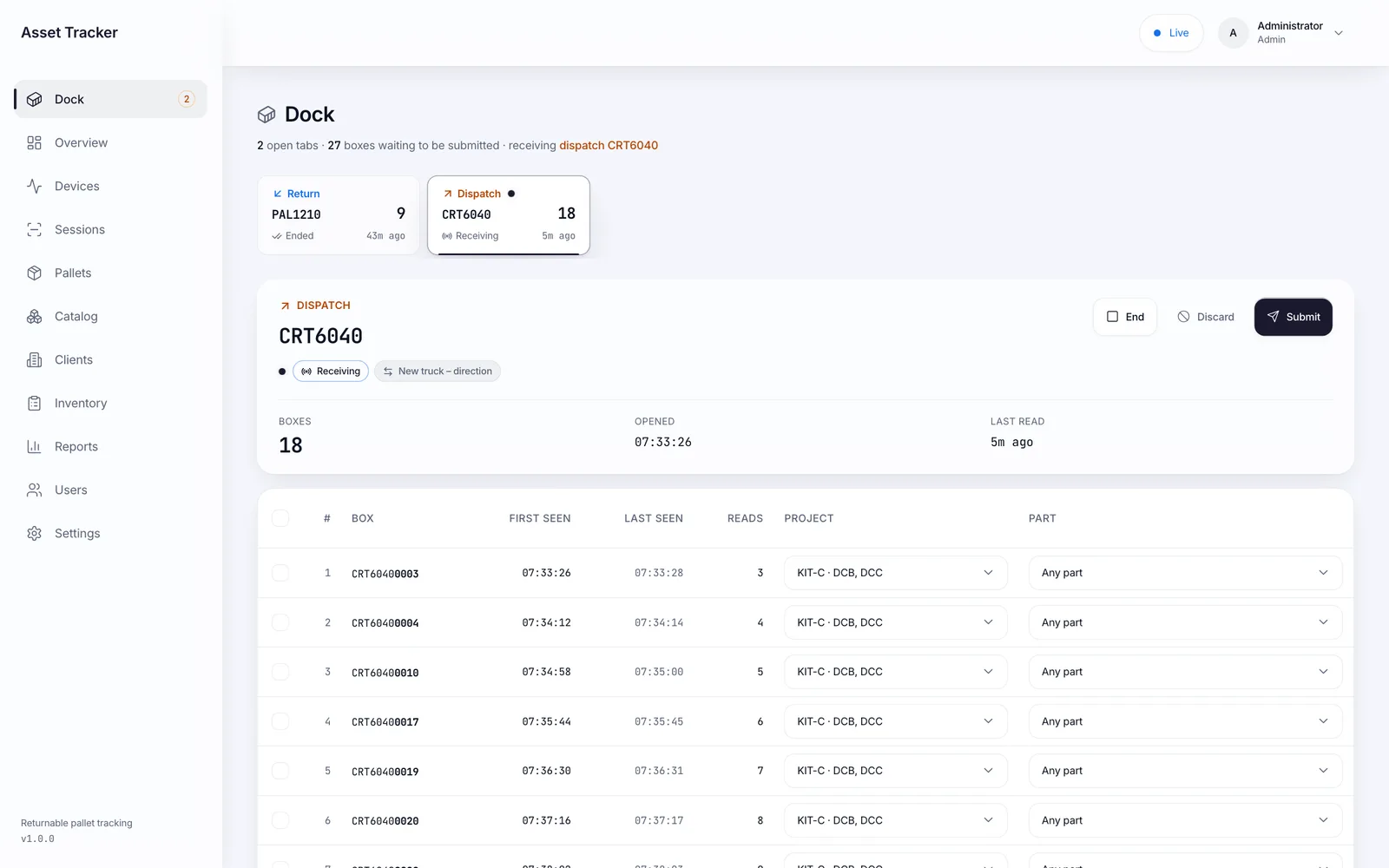
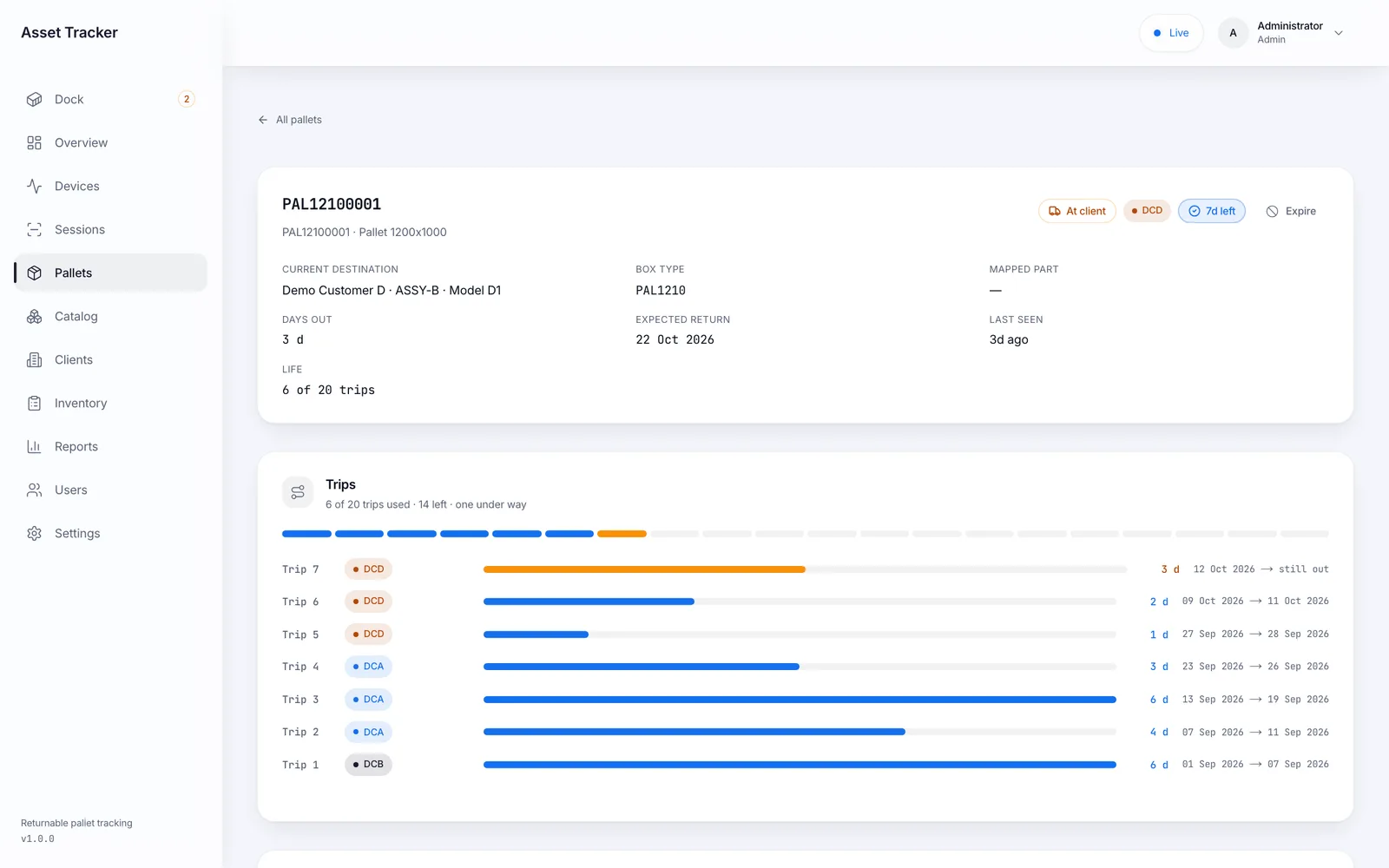
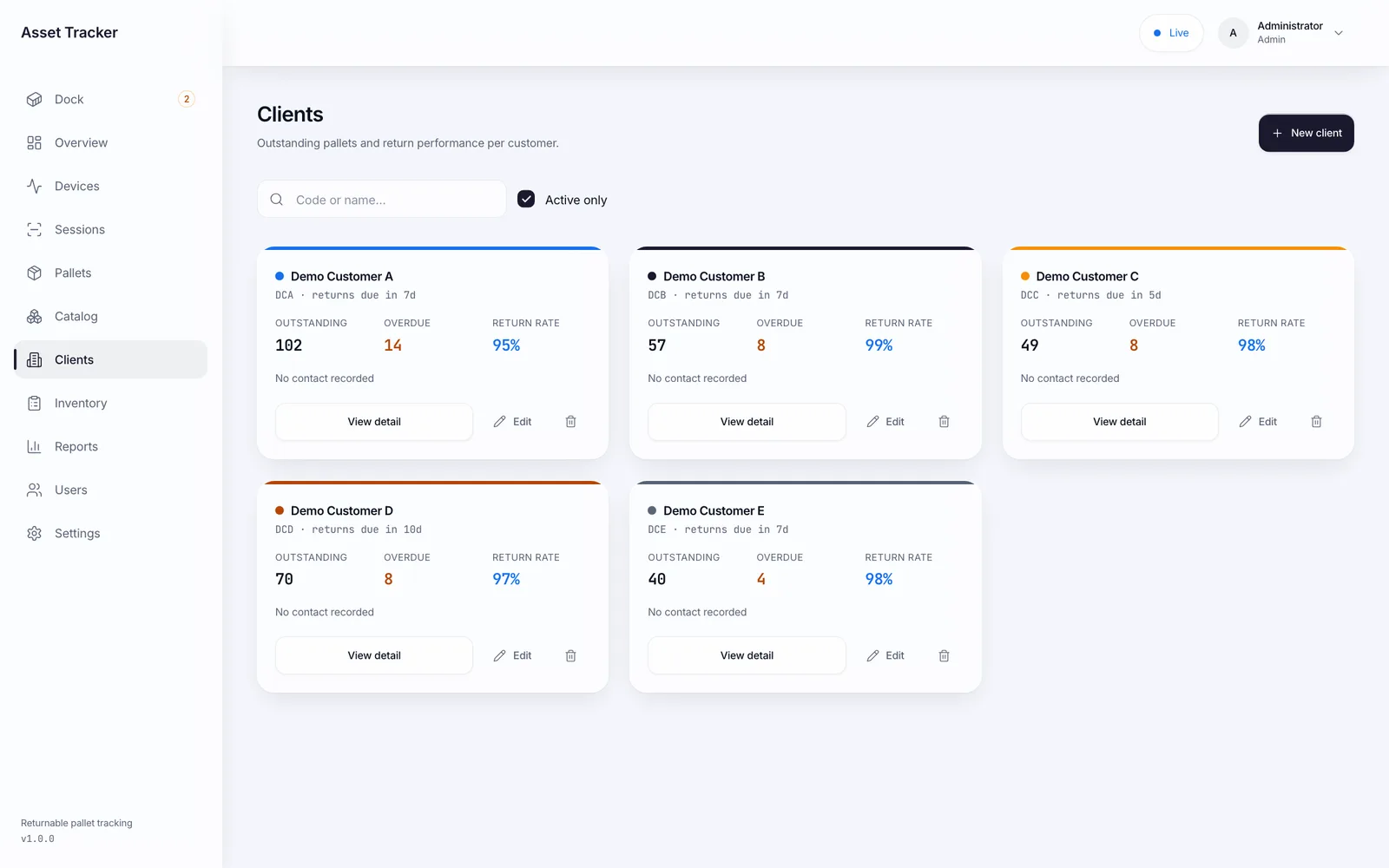
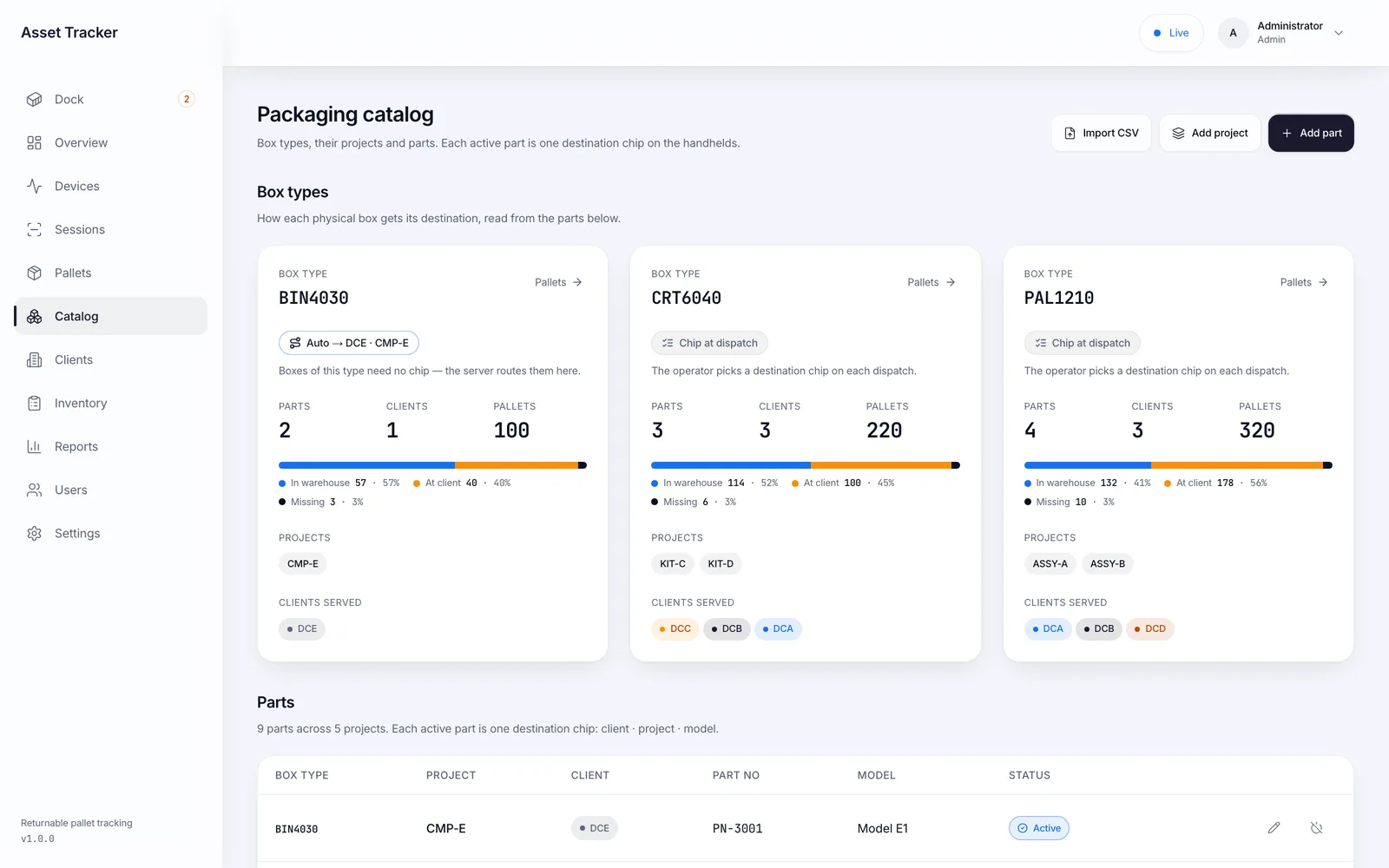
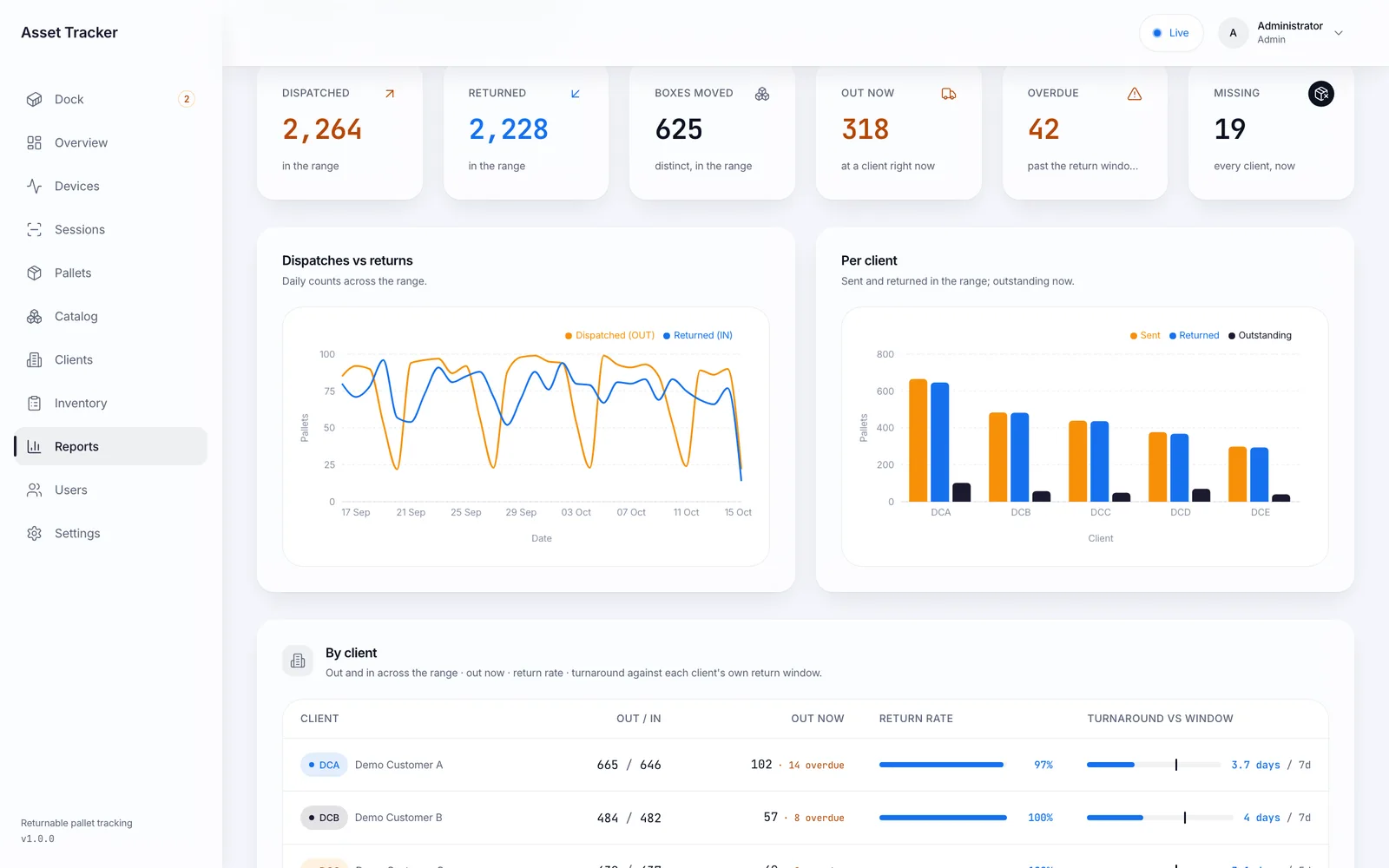
S-Tech Returnable Pallet & Asset Tracker keeps a ledger for every returnable box you own. Each pallet, crate, bin or container carries one UHF tag, and its life is a strict alternation: sent out to a customer, returned empty, sent out again. A fixed reader at the dock reads every box that passes and streams the reads to the server, which sorts them into shipment tabs on a browser dock screen; nothing reaches the ledger until someone presses Submit. Nobody chooses dispatch or return — the system works it out for each box from its own history. An Android UHF handheld registers new boxes, takes stock and finds a single box by signal strength, and keeps working when the Wi-Fi drops. The dashboard shows what is out, what is overdue and what is missing, per customer and per box.
1 tag
Per box — its whole history on one ledger
0 choices
Dispatch or return worked out per box, never picked
24 h
Handheld keeps working with no network
Why this exists
What it fixes
These are the problems clients describe to us before they buy. If none of them sounds like your week, this may not be the right product — tell us and we will point you at a better one.
What we hear
Nobody can say how many pallets or crates are sitting at each customer, only how many keep being bought.
Dockets are written by hand at the loading bay, so a box sent to one customer and booked against another is never found.
A return mixed into an outgoing load, or a dispatch left in a pile of empties, goes unnoticed until the counts stop adding up.
Nobody knows how long a box takes to come back, so overdue holding is never chased and the fleet is sized by guesswork.
What is inside
10 modules
Every deployment turns on the modules you need. Nothing here is a separate purchase unless the plan says so.
Dock shipments
A fixed reader at the dock reads all the time and streams every read. The server sorts them into shipment tabs — one direction and one box type per tab — and a new truck opens a new tab on its own. On the dock screen the supervisor ends a tab, moves boxes between tabs, splits at read gaps, sets the project or part per box and submits. Nothing is written to the ledger until Submit, and nothing is dropped without Discard.
Direction worked out per box
The operator never picks dispatch or return. Each box's own movement count decides it — odd is out, even is back. A return is credited to the customer it actually went to, whatever is selected on screen, and a handheld scan that mixes dispatches and returns is refused with the odd ones out named.
Pallet master & ledger
Every box with its code, box type, status, current customer, due date and last seen. Each box page shows its trips as a timeline, how many trips of its life are used, and lets you expire a damaged box or bring one back. Movements are append-only; a wrong session is voided, never edited.
Packaging catalog & routing
Box types, the projects they carry and the parts each customer takes, imported from CSV. A box type that only one customer takes routes itself with no choice at the dock; the rest are chosen at dispatch. A dispatch outside the catalog is recorded and flagged, never refused.
Customer balances
Per customer: pallets out now, overdue against their own return window, total sent and returned, return rate, average turnaround and an aging view of what is out — 0–7, 8–15, 16–30 and 30+ days.
Handheld registration
Pick the box type, press Start, and every new tag read is coded and registered — a whole stack at once, or one tag held against the reader. The server hands out the serials, so two handhelds never write the same code. Boxes can also be added or imported from CSV on the dashboard.
Stock-take & find
Walk the yard with the handheld and reconcile against the pallet master: present, missing and unexpected. Marking boxes missing or returned is a separate, explicit step. Find mode tracks down one box by signal strength.
Offline-first handheld
Every scan is saved on the device before it is sent, and each session carries its own ID so a retry can never create a second dispatch. Operators can sign in offline for 24 hours; queued scans sync when the network returns.
Reports & export
Summary, movements, outstanding and per-box history, filtered by date, customer, project or box. Daily out-versus-in chart, per-customer and per-project breakdowns, CSV export of every row and a printable PDF of what is on screen.
Devices, users & audit
Live view of every handheld and dock reader — online, battery, last user — with remote start, stop and submit. Admin, supervisor and operator roles, and a session list showing who scanned what, on which device, with vehicle and docket number.
The RFID difference
What RFID adds over manual and barcode
Barcode and manual entry still work everywhere in this product. This is what changes when you add RFID on top.
- A fixed reader at the dock counts every box on a truck as it is loaded or unloaded. Nobody climbs on the vehicle or trusts the driver's note.
- Because the count costs nothing, it happens at every movement — which is what turns a pile of missing pallets into a named customer and a date.
- Each box has its own tag and its own ledger, so the system knows a box is going out or coming back without anyone telling it.
- A handheld counts a yard or a stack in one walk, and Find mode tracks down a single box by signal strength.
Deployment
Cloud, your server, or no internet at all
The same software either way. This is a deployment choice, not a different edition with fewer features.
Cloud
Hosted and managed. Nothing to install, live in days.
Self-hosted
On your own server, inside your building. You own the database.
Runs on
- Web dashboard (any modern browser)
- Android UHF handheld app
- Android fixed UHF dock reader (same app)
- Server on Windows, macOS or Linux
Integrates with
- CSV export of movements, outstanding boxes and box history
- CSV import of the packaging catalog and of boxes
- Printable PDF reports
- REST API with live Socket.IO updates
Who it is for
- Manufacturers that ship on returnable pallets, crates or bins
- Automotive and engineering suppliers with returnable packaging
- FMCG and beverage companies with crate fleets
- Warehouses and 3PLs that issue and receive returnable containers
Every S-Tech product
The same nine promises, on all 22 products
These are not per-product features. They apply to everything we build, and they are the reason our software works on sites where other systems do not.
RFID-first
Every product is built around RFID speed and modern technology from the start, not bolted on afterwards.
Any RFID hardware
Ready to configure with any make of RFID hardware. Barcode, QR code and traditional manual methods work by default.
Runs anywhere
Web, Windows, macOS, Linux, Ubuntu, Unix and Android. Your team uses the machine it already has.
Online or offline
Works fully online in the cloud, or fully offline on a local server, and syncs when a connection returns.
Self-hosted option
Host it on your own server and keep the data inside your building. No dependence on our infrastructure.
White-label
Available under your own brand — logo, colours, product name and domain.
Customisable
Every deployment is unique. Modules, fields, forms, reports and workflows are changed to fit your process.
Performance & reliability
Built for speed and uptime under real load, on real hardware, in places with unreliable power and network.
Secure by design
Encrypted data, role-based access, full audit trail and scheduled backups. You own the data.
A note on wording: where we say "fully offline" we mean the system runs on a local server on your own network with no internet connection, and syncs when one returns. Where we say "secure" we mean encrypted data, role-based access, a full audit trail and backups you control. We would rather be specific than round it up to 100%.
Questions
Before you ask us
The things buyers actually check. If your question is not here, ask it — we answer honestly, including when the answer is no.
Does the operator have to say whether a truck is loading or unloading?
No. Every box's direction comes from its own history: a box last sent out is coming back, a box last returned is going out. The dock screen sorts dispatches and returns into separate tabs, and the handheld refuses a scan that mixes the two and names the boxes that do not belong.
What happens if the dock reader picks up a box that is just parked by the door?
A box read again within a few hours of its dispatch, or within minutes of its return, is treated as the same event, not a new movement. Nothing is written until someone submits the tab, so a stray read is moved or removed at no cost.
Do we need a fixed reader at every location?
No. A fixed reader earns its place at a busy dock. Registration, stock-takes and finding a single box are done with an Android UHF handheld, which works offline and syncs later.
Can it run on our own server without internet?
Yes. It can be hosted, or installed on a PC on your site network so the dashboard, handhelds and dock reader never need the internet.
What happens to a box that is worn out or damaged?
Each box has a set number of round trips (10 by default). The return that completes its last trip retires it automatically, and a supervisor can expire a damaged box by hand. Retired boxes are ignored by every reader and report from then on.
Can it carry our name?
Yes. The product name, logo and the letterhead on printed reports can be your own, and no screen on the readers or the dashboard names the hardware maker.
Related products and solutions
Software
Warehouse Management System
Inbound to dispatch, counted by RFID instead of by hand
Read moreSoftware
Universal Enterprise Asset & Business Operations Platform
The flagship — asset tracking joined to daily operations, in any industry
Read moreSoftware
AIR — Cloud RFID Inventory
Full stock audits in minutes, not days
Read moreSolution
Returnable Assets & Pallets
A returnable fleet you can actually account for, with the loss visible and attributable.
Read moreSolution
Asset Management
Know what you own, where it is and what condition it is in — verified by a walk-through, not a spreadsheet.
Read moreSolution
Warehouse Management
Receive, store, pick and dispatch faster, with stock accuracy that holds between counts instead of decaying.
Read moreSee Returnable Pallet & Asset Tracker on your own data
A demo runs on your process, not a canned dataset. Bring a real scenario and we will show you how it handles it — including the parts it does not.
Or call +91 97305 32888 — Monday to Saturday, 9:30 am to 6:30 pm.