
Education · Software
School ERP
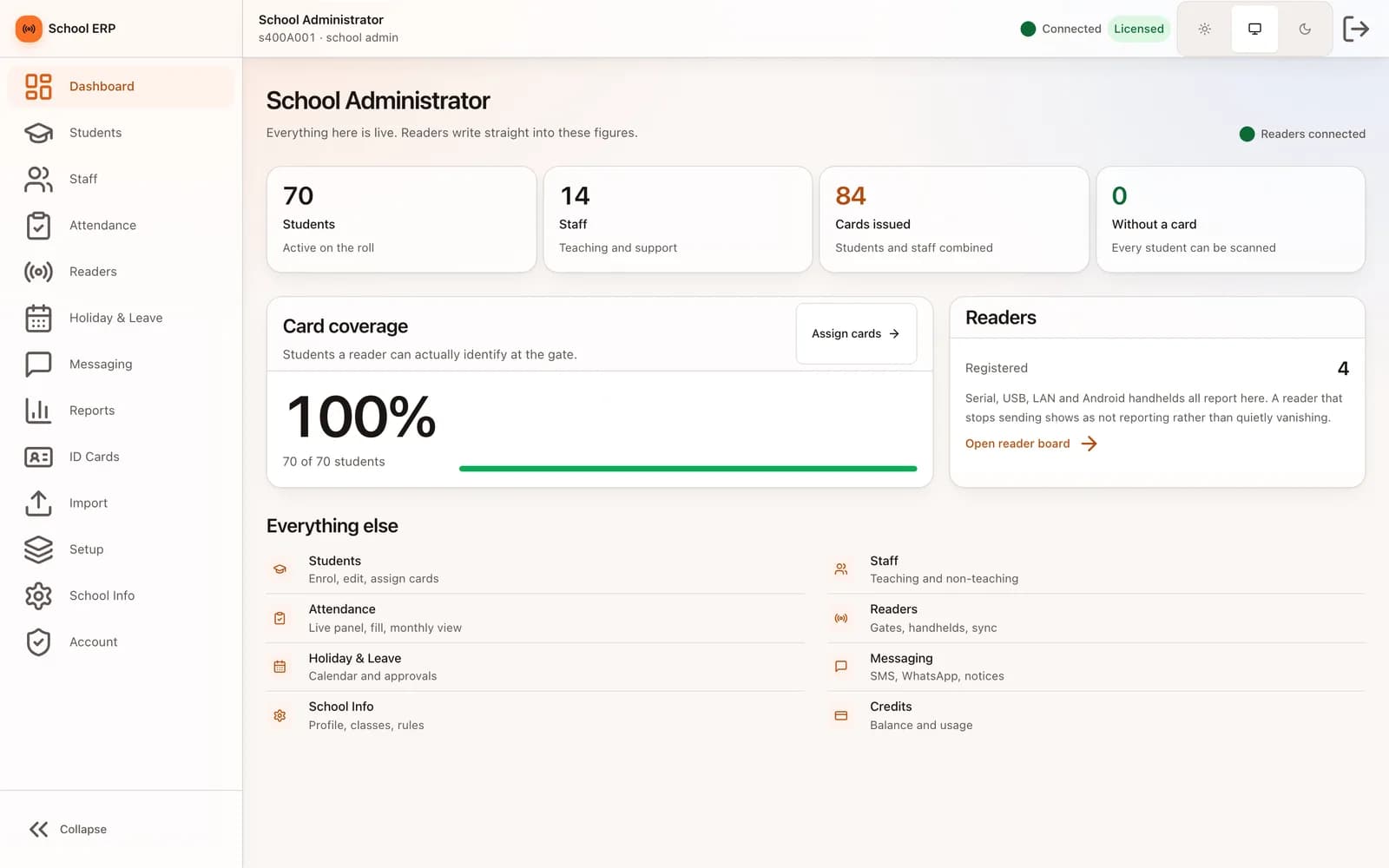
Mark every student and teacher as they walk through the gate with UHF or LF RFID, see each scan the moment it happens, and give parents an app that shows when their child arrived.
Inside the product
Real screens
Shown on demo data. Click any screen to see it full size.
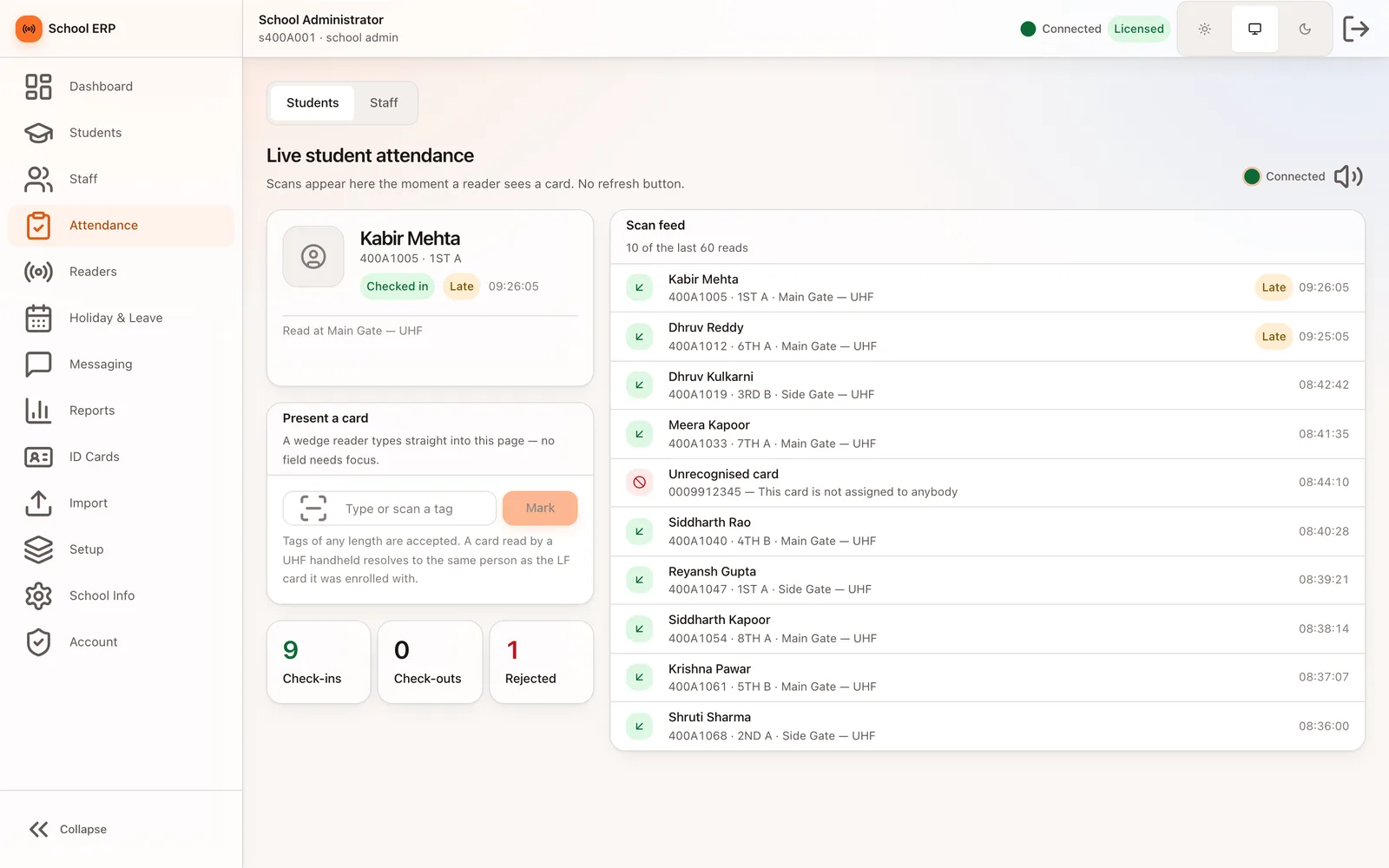
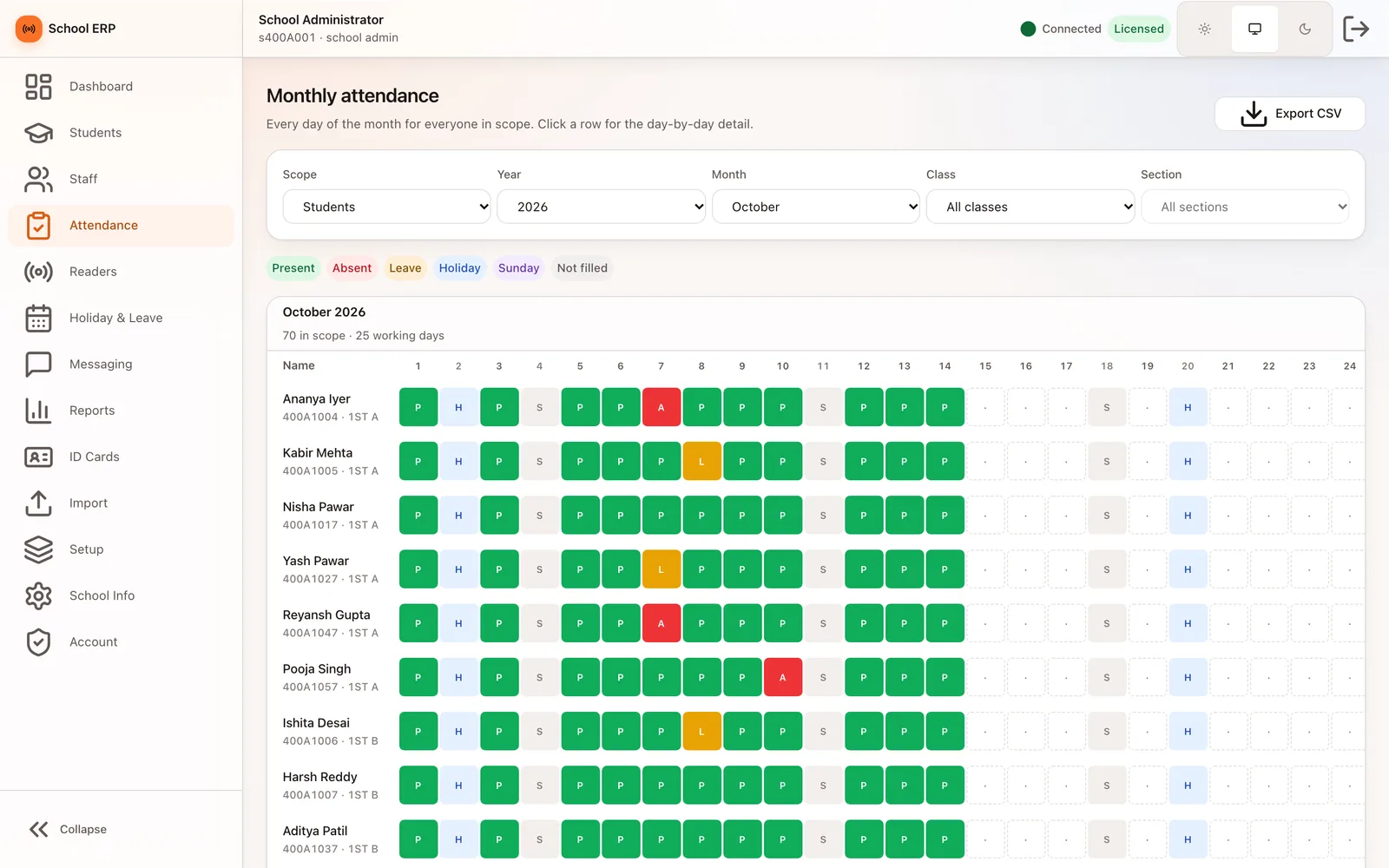
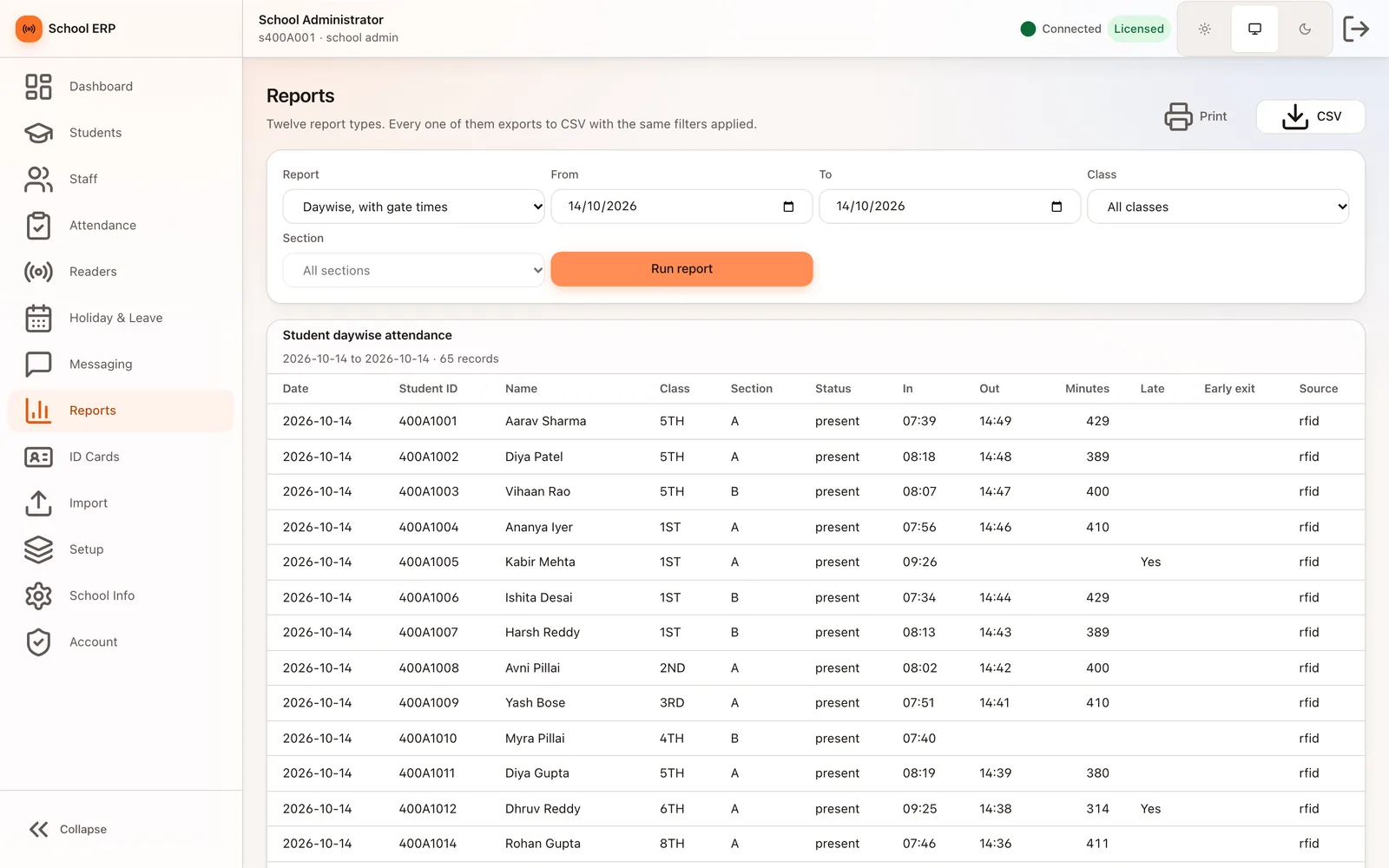
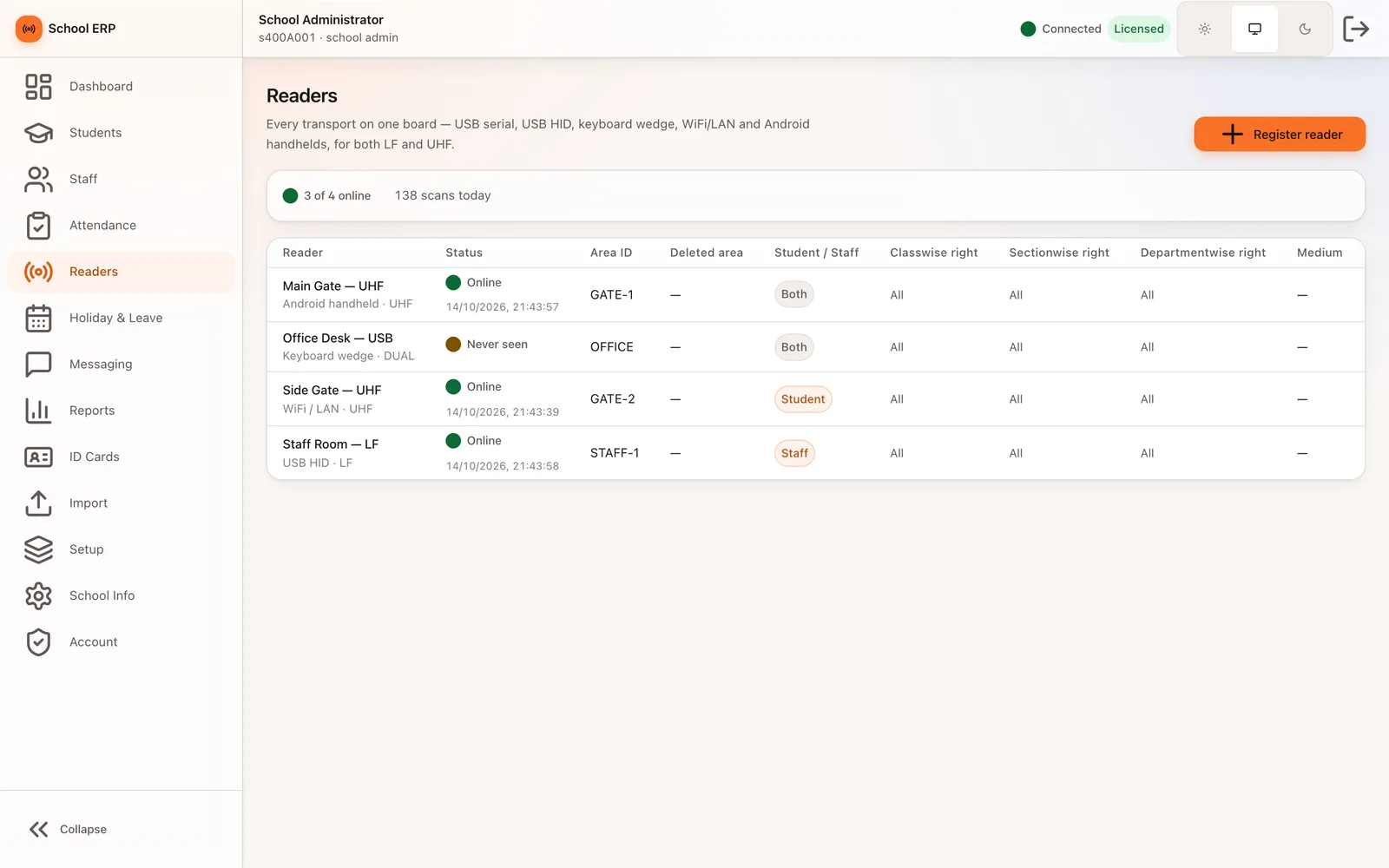
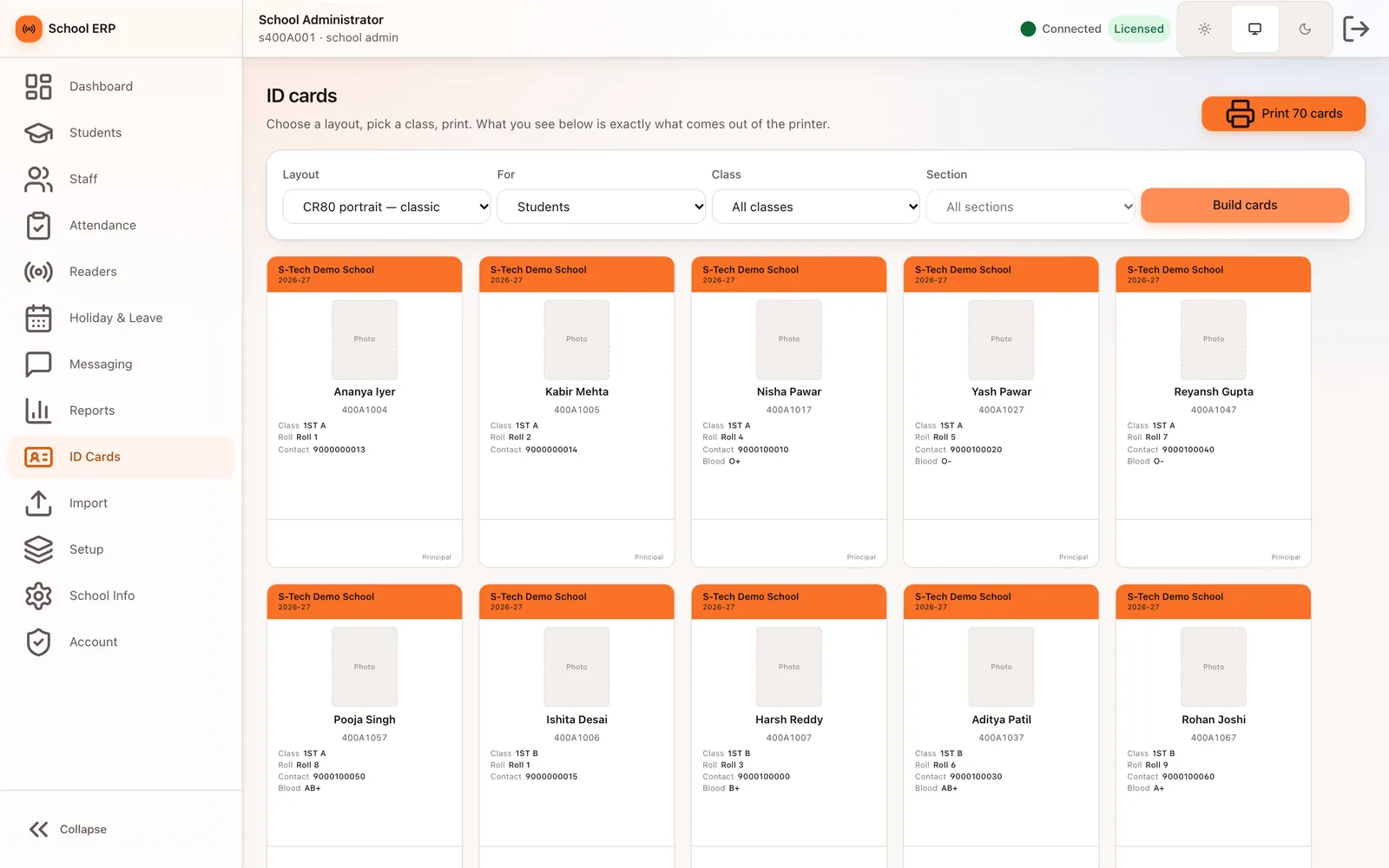
S-Tech School ERP is built around attendance. Gate and desk readers mark students and staff as they arrive and leave, and every read appears on a live panel within a second. Around that sit the records and routines a school office runs every day: students and staff, classes and sections, card issue, holidays and leave, SMS and WhatsApp to parents, twelve attendance reports, printable ID cards and a parent app for Android and iOS. One installation can serve several branches, either hosted by us or on a server at the school.
5
Reader connection types on one board
12
Attendance report types, all exportable to CSV
Any length
Card numbers stored exactly as read
Why this exists
What it fixes
These are the problems clients describe to us before they buy. If none of them sounds like your week, this may not be the right product — tell us and we will point you at a better one.
What we hear
Attendance is taken on a paper register, so the office does not know who is in school until mid-morning and the monthly figures are rebuilt by hand.
Older RFID systems only accept one card format, so a card read on a different reader is reported as unknown.
Parents only find out their child was absent when the school phones them, and messages to a whole class are sent one at a time.
Leave, holidays and Sundays are counted by hand, so monthly percentages and leave days never quite agree.
What is inside
12 modules
Every deployment turns on the modules you need. Nothing here is a separate purchase unless the plan says so.
Live attendance panel
Every card read appears the moment the reader sends it, with name, class, check-in or check-out, a late flag and the reader it came from. Unrecognised cards are shown in red, not silently dropped.
Readers board
USB serial, USB HID, keyboard-wedge, WiFi/LAN and Android UHF gate readers on one board, LF and UHF. Shows which are online, scans today and class, section or department limits for each reader.
One card, any reader
Tag numbers of any length are stored exactly as read. The same card resolves whether an LF desk reader or a UHF gate reports it, in decimal, hex or facility:card form, and a duplicate card names the person who already holds it.
Students and staff
Student records with guardians, category, class, section and roll number; staff records with designation, department and teaching or non-teaching category. Cards are assigned by typing the number or scanning the card at any reader.
Manual fill and monthly grid
Mark a class or the staff by hand for any day with a bulk default, without overwriting reader marks. The monthly grid shows every day as Present, Absent, Leave, Holiday, Sunday or Not filled.
Holidays and leave
A holiday calendar for students, staff or both. Student and staff leave with approval; leave days leave out Sundays and holidays, and approval marks attendance for the working days only.
SMS, WhatsApp and email
Send to chosen classes, sections, staff departments or single people. Each send is costed in credits before it goes, per-student opt-outs are respected, and absentee and birthday messages run from templates.
Reports and exports
Twelve report types: daily class-wise, monthly, day-wise with gate in and out times, staff category-wise, weekly, annual, chronic absentees and punctuality. Every one prints and exports to CSV.
ID cards, QR and barcodes
Student and staff ID cards in four layouts, rendered at real card size so the preview is what prints. QR codes and barcodes generated per student for batch printing.
Import wizard
Bring students or staff in from a CSV with column mapping, a dry run that lists every problem row by number, and one-step rollback of a whole import.
Parent app
Android and iOS app showing today's arrival time, attendance history and monthly summary, holidays and notices, with leave requests sent straight to the school. Each parent sees only their own children.
Branches, roles and licensing
Several schools and branches on one platform with their data kept apart. School admin, branch admin, teacher and office staff roles, two-factor sign-in, an audit trail, and a control panel for plans, licences and message credits.
The RFID difference
What RFID adds over manual and barcode
Barcode and manual entry still work everywhere in this product. This is what changes when you add RFID on top.
- A UHF gate reader marks students as they walk through, so morning attendance is complete before the first bell without a queue at a tap reader.
- Check-in and check-out times are recorded per student, so the day-wise report shows when each child actually arrived and left.
- A card enrolled on an LF desk reader is still recognised by a UHF gate or handheld, so a school can mix readers without re-issuing cards.
- Readers keep a local queue when the network drops and replay it later without marking anyone twice.
Deployment
Cloud, your server, or no internet at all
The same software either way. This is a deployment choice, not a different edition with fewer features.
Cloud
Hosted and managed. Nothing to install, live in days.
Self-hosted
On your own server, inside your building. You own the database.
Runs on
- Web
- Android (parent app and UHF gate reader)
- iOS (parent app)
- Windows / Linux PC (reader agent)
- Linux / Ubuntu server
Integrates with
- SMS and WhatsApp Business gateway with DLT templates
- Email over SMTP
- USB serial, USB HID, keyboard-wedge and LAN RFID readers
- Android UHF gate reader units
- CSV import and export
Who it is for
- Schools moving from a paper register to gate attendance
- Schools replacing an older RFID attendance system
- School groups running several branches
- Junior colleges and coaching institutes
How it is sold
Plan tiers
Actual pricing depends on modules, users, sites and whether you host it yourself, so it is quoted. These tiers tell you where you would sit.
Attendance
RFID and manual attendance, live panel, readers board, holidays and leave, reports and ID cards for one school.
Get a priceComplete
Everything in Attendance plus SMS, WhatsApp and email messaging, absentee and birthday messages, and the parent app.
Get a priceGroup
Several branches on one platform with central licences and message credits, hosted by us or on a server at your school.
Get a priceEvery S-Tech product
The same nine promises, on all 22 products
These are not per-product features. They apply to everything we build, and they are the reason our software works on sites where other systems do not.
RFID-first
Every product is built around RFID speed and modern technology from the start, not bolted on afterwards.
Any RFID hardware
Ready to configure with any make of RFID hardware. Barcode, QR code and traditional manual methods work by default.
Runs anywhere
Web, Windows, macOS, Linux, Ubuntu, Unix and Android. Your team uses the machine it already has.
Online or offline
Works fully online in the cloud, or fully offline on a local server, and syncs when a connection returns.
Self-hosted option
Host it on your own server and keep the data inside your building. No dependence on our infrastructure.
White-label
Available under your own brand — logo, colours, product name and domain.
Customisable
Every deployment is unique. Modules, fields, forms, reports and workflows are changed to fit your process.
Performance & reliability
Built for speed and uptime under real load, on real hardware, in places with unreliable power and network.
Secure by design
Encrypted data, role-based access, full audit trail and scheduled backups. You own the data.
A note on wording: where we say "fully offline" we mean the system runs on a local server on your own network with no internet connection, and syncs when one returns. Where we say "secure" we mean encrypted data, role-based access, a full audit trail and backups you control. We would rather be specific than round it up to 100%.
Questions
Before you ask us
The things buyers actually check. If your question is not here, ask it — we answer honestly, including when the answer is no.
Do students have to tap a card at the gate?
Not with a UHF gate reader: it reads the card as the student walks through. LF desk readers take a tap, and both kinds can be used in the same school against the same cards.
What if the internet at the school goes down?
Readers keep a local queue of scans and send it when the connection returns, each scan with its own key so nobody is marked twice. A school-hosted server checks its licence online at regular intervals, with a grace period for short outages.
We already use an RFID attendance system. Can we move across?
Yes. Students and staff come in through the import wizard with a dry run first, existing card numbers are kept exactly as they are, and the student login ID format your staff already type is kept.
How are cards issued?
We supply blank or pre-printed RFID cards and a card printer. The office assigns a card by scanning it at any reader, and prints ID cards from the built-in layouts, including replacements.
Related products and solutions
Software
Smart Attendance System
Hands-free attendance that walks through the door
Read moreSoftware
Entrance Automation System
Gates, visitors and vehicles handled without a register
Read moreSoftware
SMS & WhatsApp Business API Gateway
The messaging layer behind every other S-Tech product
Read moreSoftware
HRMS
Attendance, leave and payroll that agree with each other
Read moreSolution
Smart School Management
Attendance without a register, parents informed the moment a child arrives, and the office running on one system.
Read moreSolution
Entrance, Attendance & Access Control
One credential for the gate, the door, attendance and the canteen — with a record of everything.
Read moreSee School ERP on your own data
A demo runs on your process, not a canned dataset. Bring a real scenario and we will show you how it handles it — including the parts it does not.
Or call +91 97305 32888 — Monday to Saturday, 9:30 am to 6:30 pm.