
Healthcare · Software
Pharmacy Management System
Bill at the counter from a barcode or a doctor’s prescription, keep stock by batch and expiry, and close the cash counter at the end of the day.

Inside the product
Real screens
Shown on demo data. Click any screen to see it full size.
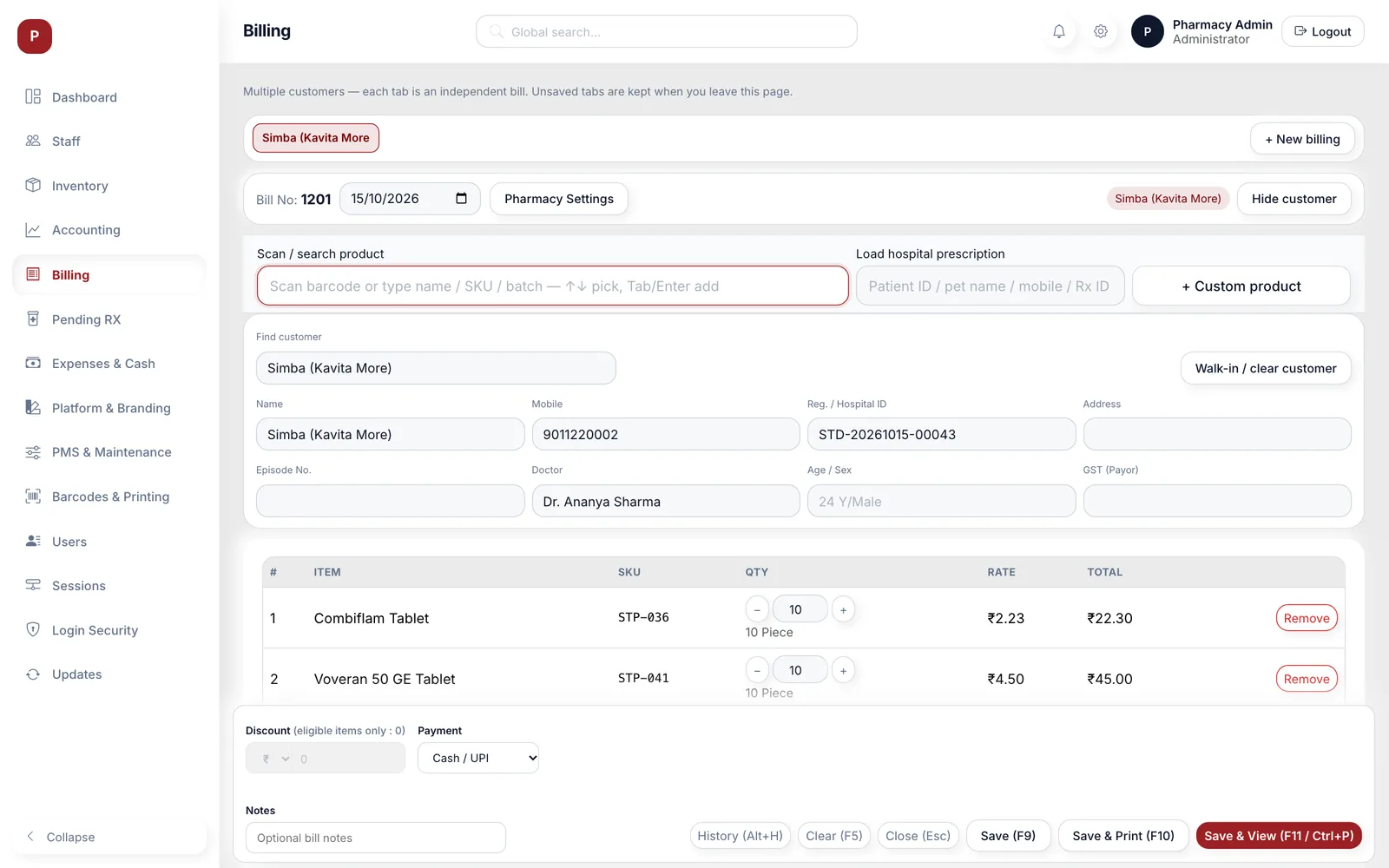
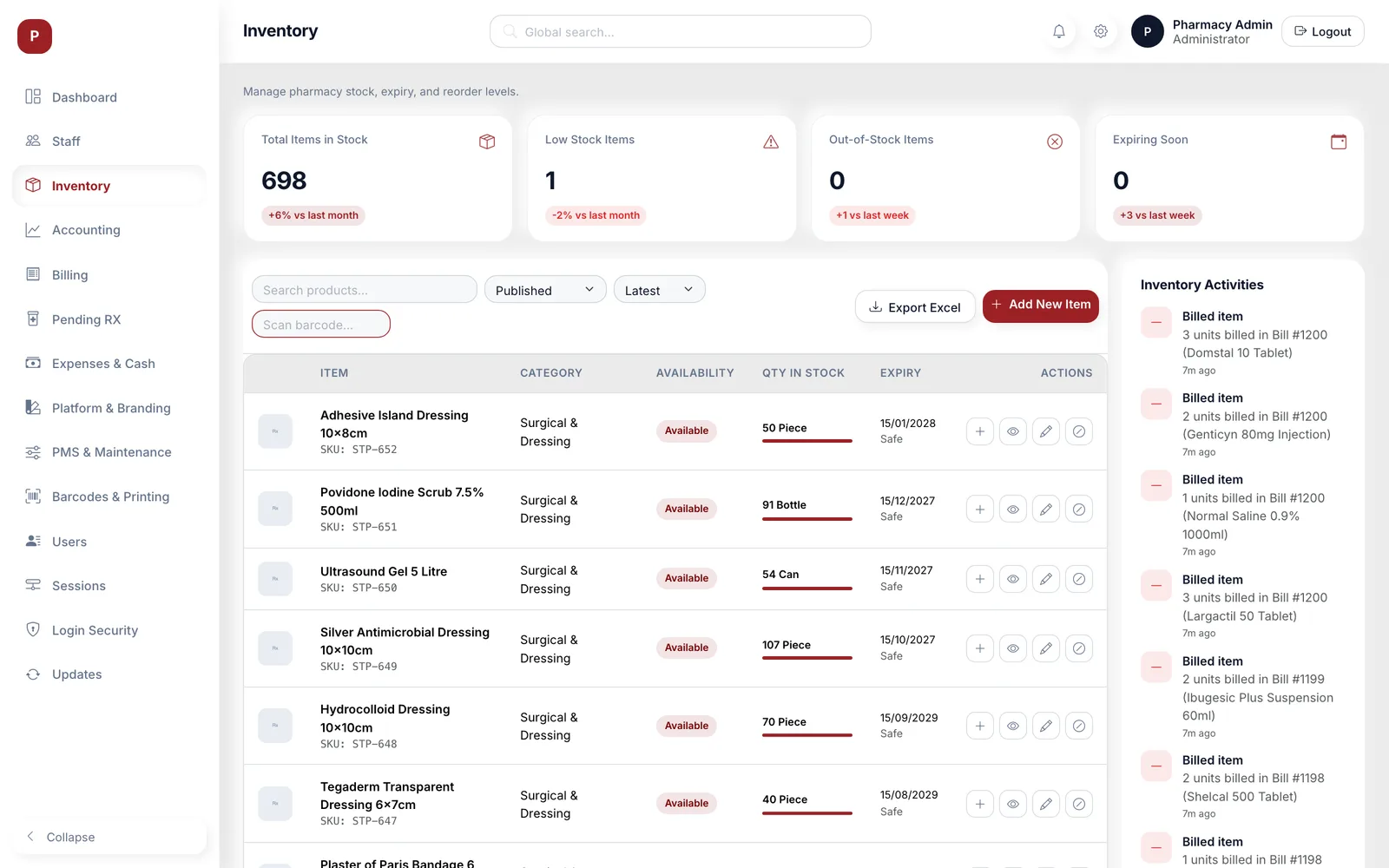
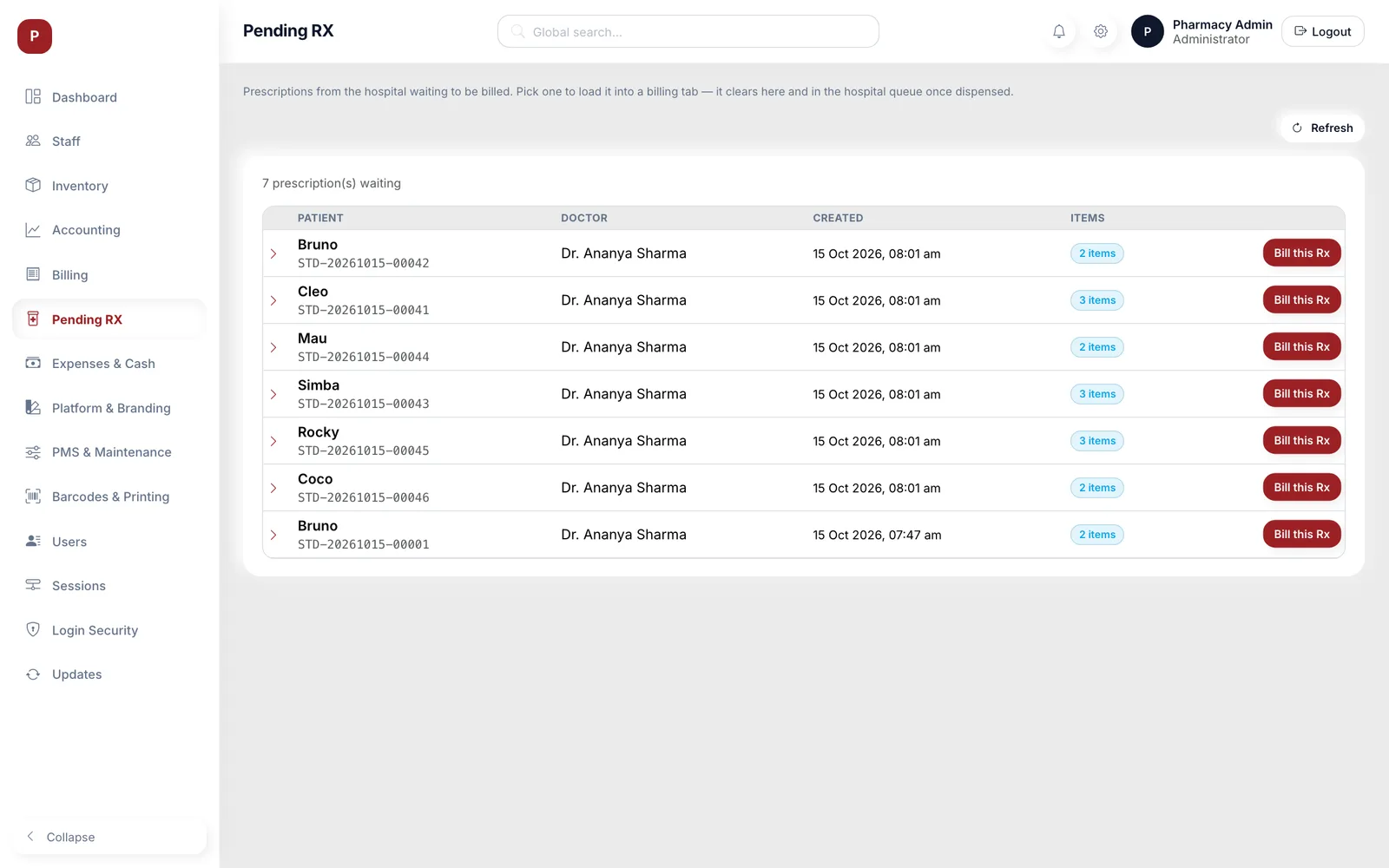
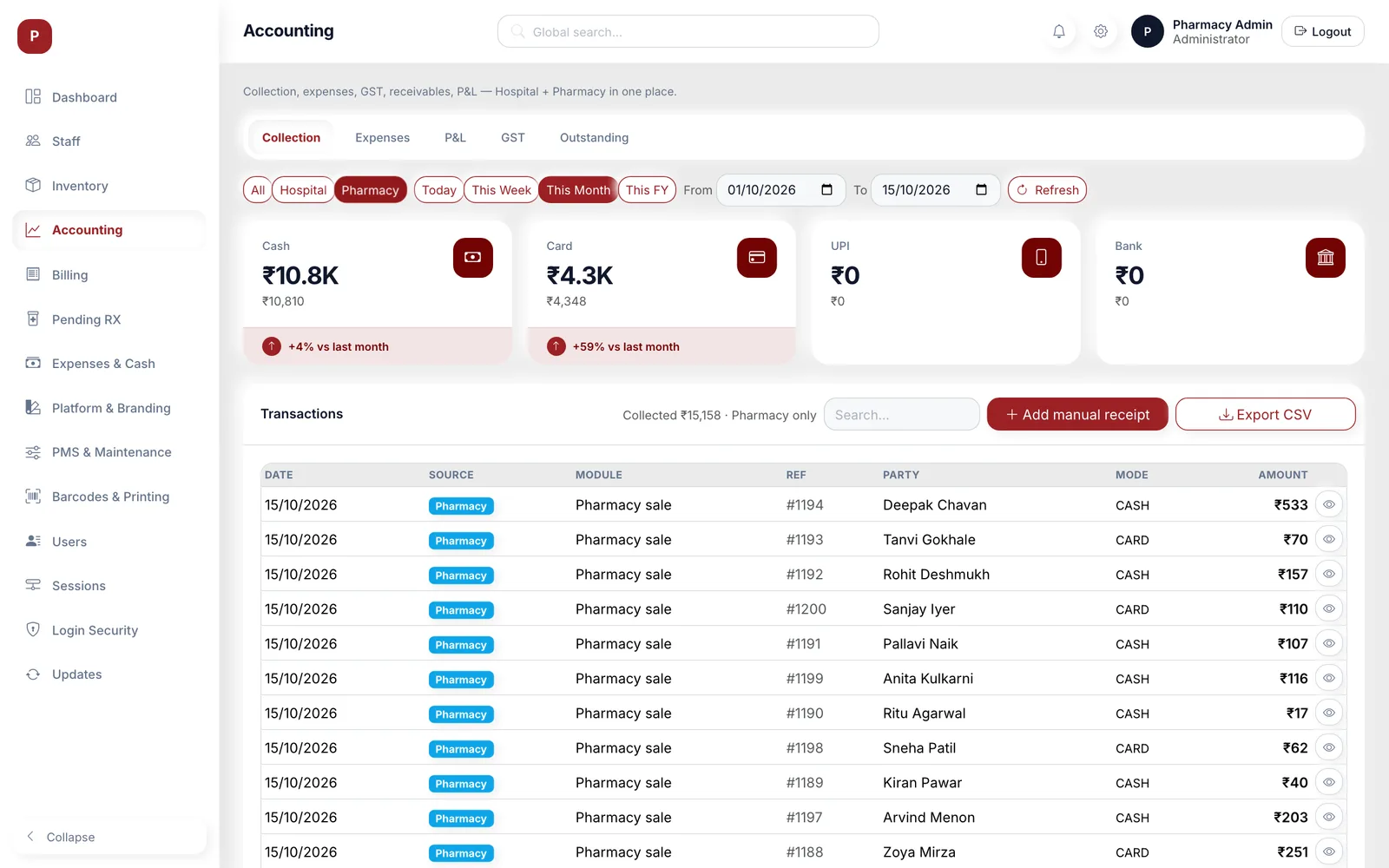
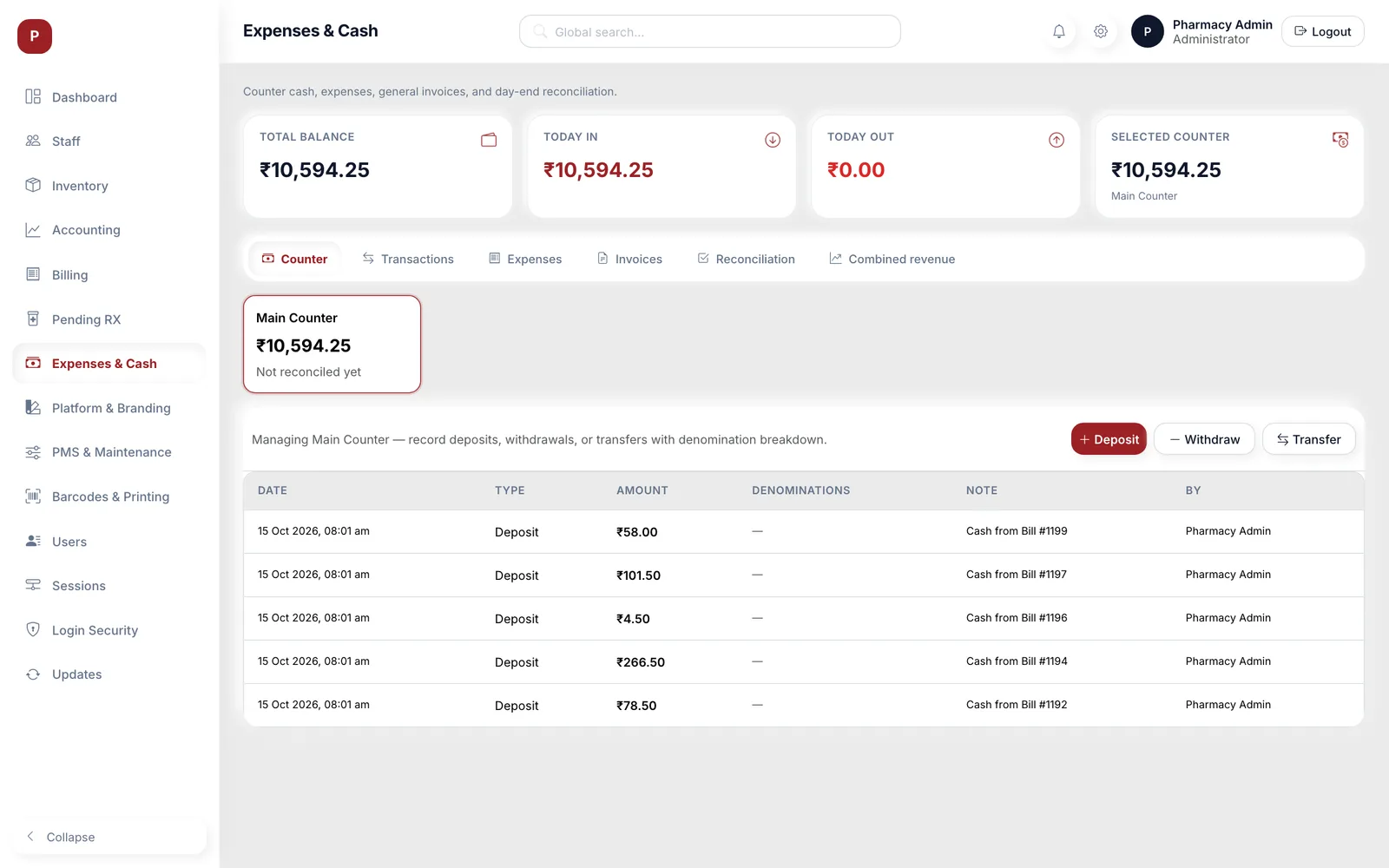
S-Tech PMS is the desktop pharmacy counter that runs alongside S-Tech HMS. Products are found by name, generic name, SKU, barcode or batch number, stock is held batch by batch with the earliest expiry sold first, and prescriptions written in the hospital arrive in a Pending Rx list ready to bill. Cash counters, expenses, profit and loss and a GST summary sit in the same app. It runs on Windows and macOS and works against the hospital’s own server on the local network, sharing one product catalogue with the hospital system.
Why this exists
What it fixes
These are the problems clients describe to us before they buy. If none of them sounds like your week, this may not be the right product — tell us and we will point you at a better one.
What we hear
Prescriptions from the consult room arrive on paper, so the counter retypes every line and items get missed or substituted without a record.
Stock is kept as one number per product, so nobody knows which batch is on the shelf or which one expires first.
Cash in the drawer, card slips and credit bills are reconciled by hand at night, and the totals rarely match the software.
Labels and shelf tags are written by hand, so scanning at the counter is not possible.
What is inside
10 modules
Every deployment turns on the modules you need. Nothing here is a separate purchase unless the plan says so.
Counter billing
Search by name, generic name, SKU, barcode or batch, several bills open in tabs, keyboard shortcuts for save and print, cash or UPI, card or credit payment, and an A4 tax invoice with print preview.
Batch & expiry stock
Stock is held per batch with MRP, rates and expiry. Billing takes the earliest-expiry batch first, or the cashier picks one, and the inventory flags expiring and expired stock.
Prescriptions from HMS
Doctors’ prescriptions wait in Pending Rx. One click loads the patient, doctor and matched products into a bill, and saving it marks the prescription dispensed in the hospital too.
Product catalogue & inventory
Product set-up with units, pricing, MRP, GST and stock alert levels, stock adjustments, alternate names, linked substitutes, an activity log and Excel export.
Bill history, returns & edits
Bills can be edited, collected or returned within the edit window. Every edit keeps a revision, returned items go back to their original batch, and any bill can be repeated.
Customers & credit
Customer list built from billing, with bills per customer, credit outstanding and repeat bills. Credit bills require name, mobile and address.
Accounting & GST summary
Collection by mode, expenses, profit and loss, GST by rate slab and outstanding bills, for the pharmacy alone or together with the hospital, with CSV export.
Cash counters & expenses
Counters with deposits, withdrawals and transfers by denomination, expenses, general invoices and day-end reconciliation with history.
Barcodes & label designer
Barcodes per product with GS1 validation, a canvas label designer for product, batch and shelf labels, ZPL and TSPL output for thermal printers, and a print queue.
Staff, security & maintenance
Per-user permissions, active sessions, device lock with a photo on flagged logins, branding and letterhead settings, and a maintenance mode that pauses cash entries.
Deployment
Cloud, your server, or no internet at all
The same software either way. This is a deployment choice, not a different edition with fewer features.
Self-hosted
On your own server, inside your building. You own the database.
Fully offline
Runs on a local network with no internet at all, and syncs when one returns.
Runs on
- Windows desktop
- macOS desktop
- Local server on Windows or macOS
Integrates with
- S-Tech HMS (Pending Rx, shared catalogue, combined accounts)
- Zebra ZPL and TSC TSPL label printers
- Excel and CSV exports
- Optional MongoDB Atlas backup mirror
Who it is for
- Hospital pharmacies running alongside S-Tech HMS
- Veterinary hospital pharmacies
- Dispensaries that bill on a local network
How it is sold
Plan tiers
Actual pricing depends on modules, users, sites and whether you host it yourself, so it is quoted. These tiers tell you where you would sit.
Complete
Everything in Counter plus accounting, cash counters and expenses, and the barcode label designer.
Get a priceHospital
Everything in Complete plus Pending Rx from S-Tech HMS and combined hospital and pharmacy accounts.
Get a priceEvery S-Tech product
The same nine promises, on all 22 products
These are not per-product features. They apply to everything we build, and they are the reason our software works on sites where other systems do not.
RFID-first
Every product is built around RFID speed and modern technology from the start, not bolted on afterwards.
Any RFID hardware
Ready to configure with any make of RFID hardware. Barcode, QR code and traditional manual methods work by default.
Runs anywhere
Web, Windows, macOS, Linux, Ubuntu, Unix and Android. Your team uses the machine it already has.
Online or offline
Works fully online in the cloud, or fully offline on a local server, and syncs when a connection returns.
Self-hosted option
Host it on your own server and keep the data inside your building. No dependence on our infrastructure.
White-label
Available under your own brand — logo, colours, product name and domain.
Customisable
Every deployment is unique. Modules, fields, forms, reports and workflows are changed to fit your process.
Performance & reliability
Built for speed and uptime under real load, on real hardware, in places with unreliable power and network.
Secure by design
Encrypted data, role-based access, full audit trail and scheduled backups. You own the data.
A note on wording: where we say "fully offline" we mean the system runs on a local server on your own network with no internet connection, and syncs when one returns. Where we say "secure" we mean encrypted data, role-based access, a full audit trail and backups you control. We would rather be specific than round it up to 100%.
Questions
Before you ask us
The things buyers actually check. If your question is not here, ask it — we answer honestly, including when the answer is no.
Does it need S-Tech HMS?
It needs the S-Tech server, which it shares with HMS. Counter billing, stock and accounts work for the pharmacy on its own; Pending Rx and combined accounts need HMS data.
How is expiry handled?
Stock is kept per batch and billing takes the earliest-expiry batch first. The inventory flags expiring and expired batches so they can be pulled from the shelf.
Is GST filing included?
The accounting screen gives a GST summary by rate slab with taxable value and tax collected, which your CA can use for filing. Filing itself is not done from PMS.
What if the internet goes down?
Nothing changes. Billing runs against the server on the hospital network. The counter does need that local server to be reachable.
Related products and solutions
Software
Hospital Management System
Human and veterinary hospital software, from the front desk to discharge
Read moreSoftware
Lab Management System
Analyzer results straight onto the report, and back to the doctor
Read moreSolution
Healthcare Systems
One patient record across the hospital, identity confirmed at every step, and equipment that can be found.
Read moreSolution
Retail Management
Stock that is actually accurate on the shop floor, faster checkout, and fewer items walking out unbilled.
Read moreSee PMS on your own data
A demo runs on your process, not a canned dataset. Bring a real scenario and we will show you how it handles it — including the parts it does not.
Or call +91 97305 32888 — Monday to Saturday, 9:30 am to 6:30 pm.