
Business & Back-office · Software
Universal Enterprise Asset & Business Operations Platform
One white-label, multi-tenant platform that joins RFID, QR, barcode and NFC asset tracking to maintenance, stores, custody, inspections and the rest of daily operations — you switch on the modules you need.
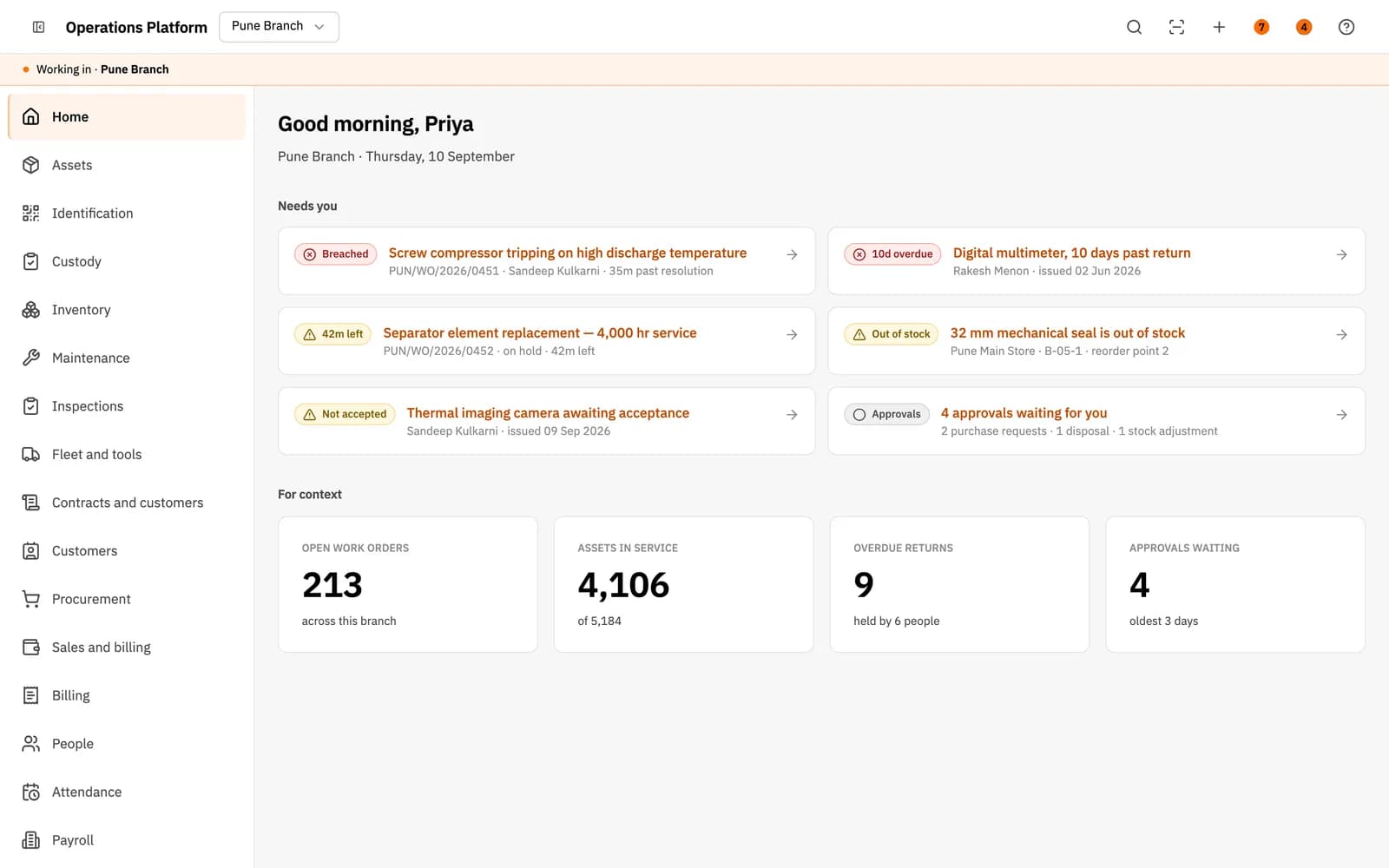
Inside the product
Real screens
Shown on demo data. Click any screen to see it full size.
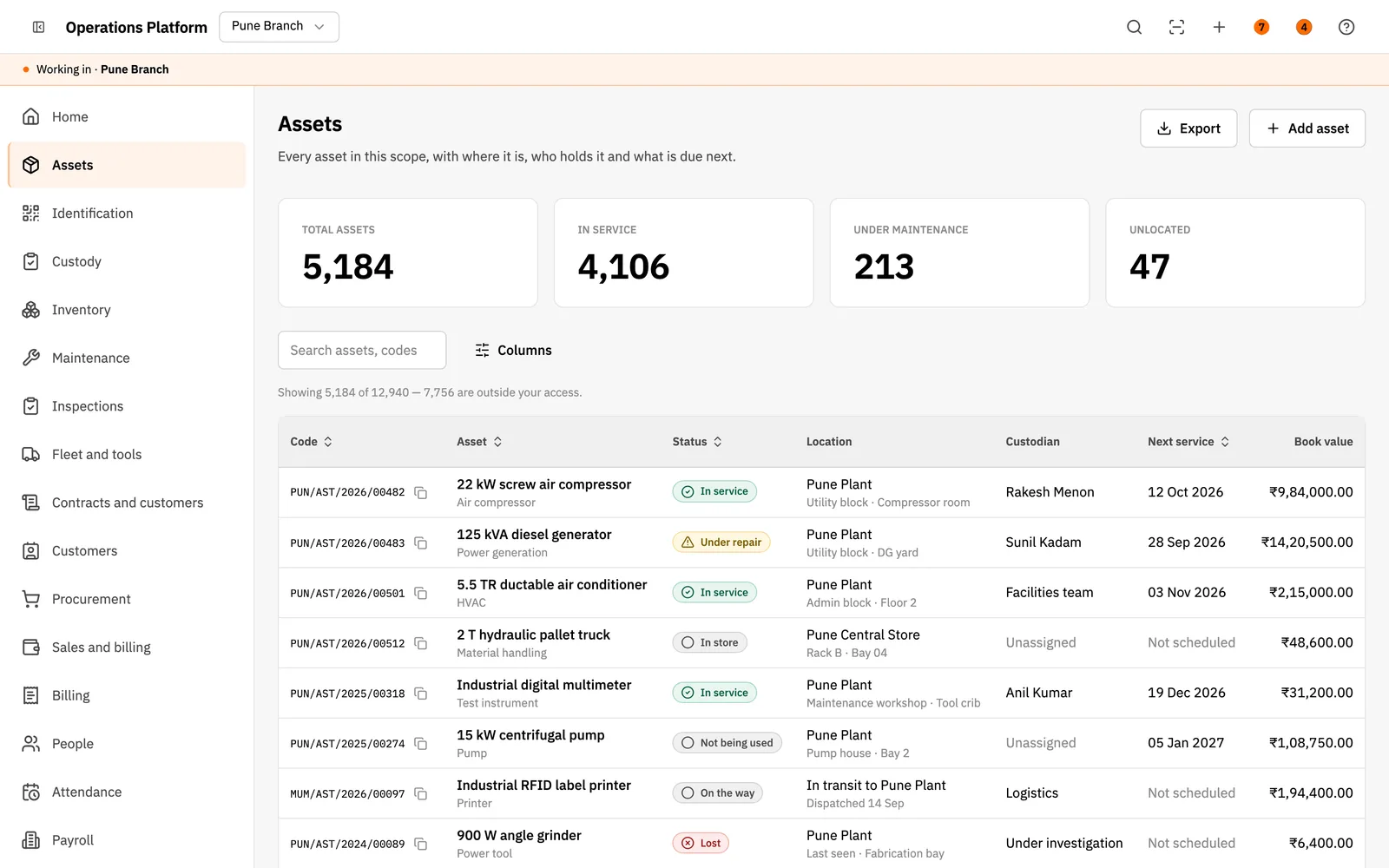
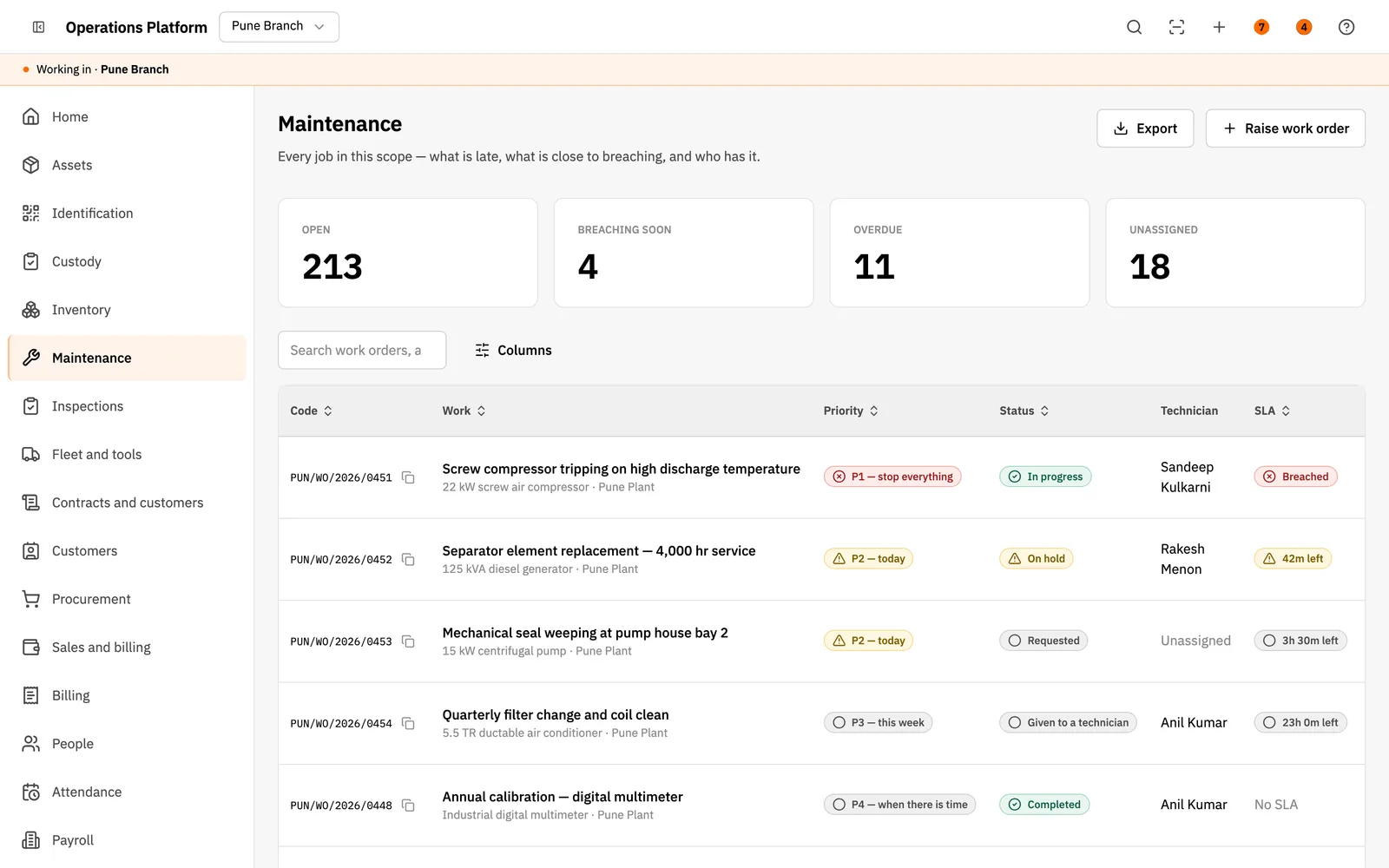
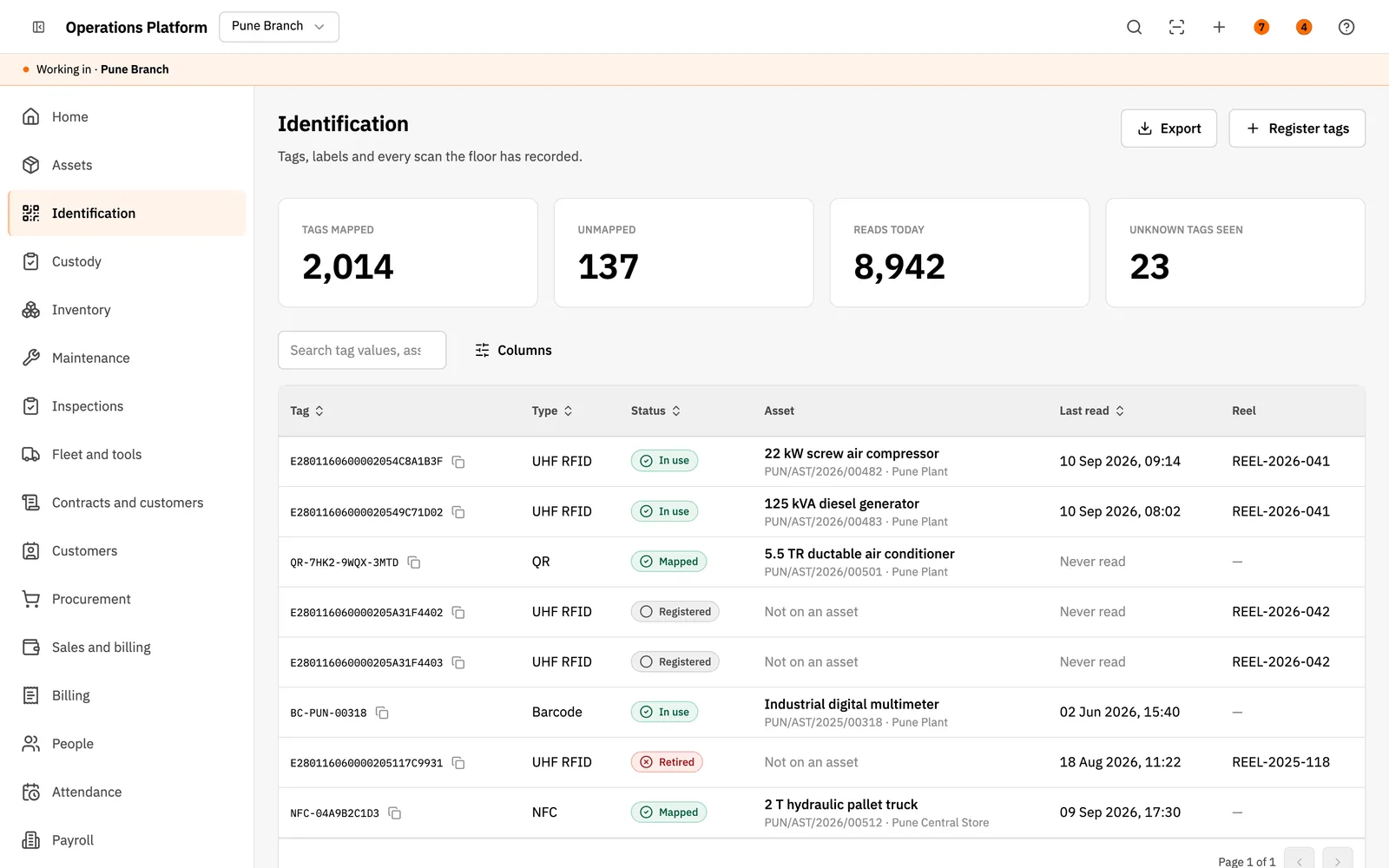
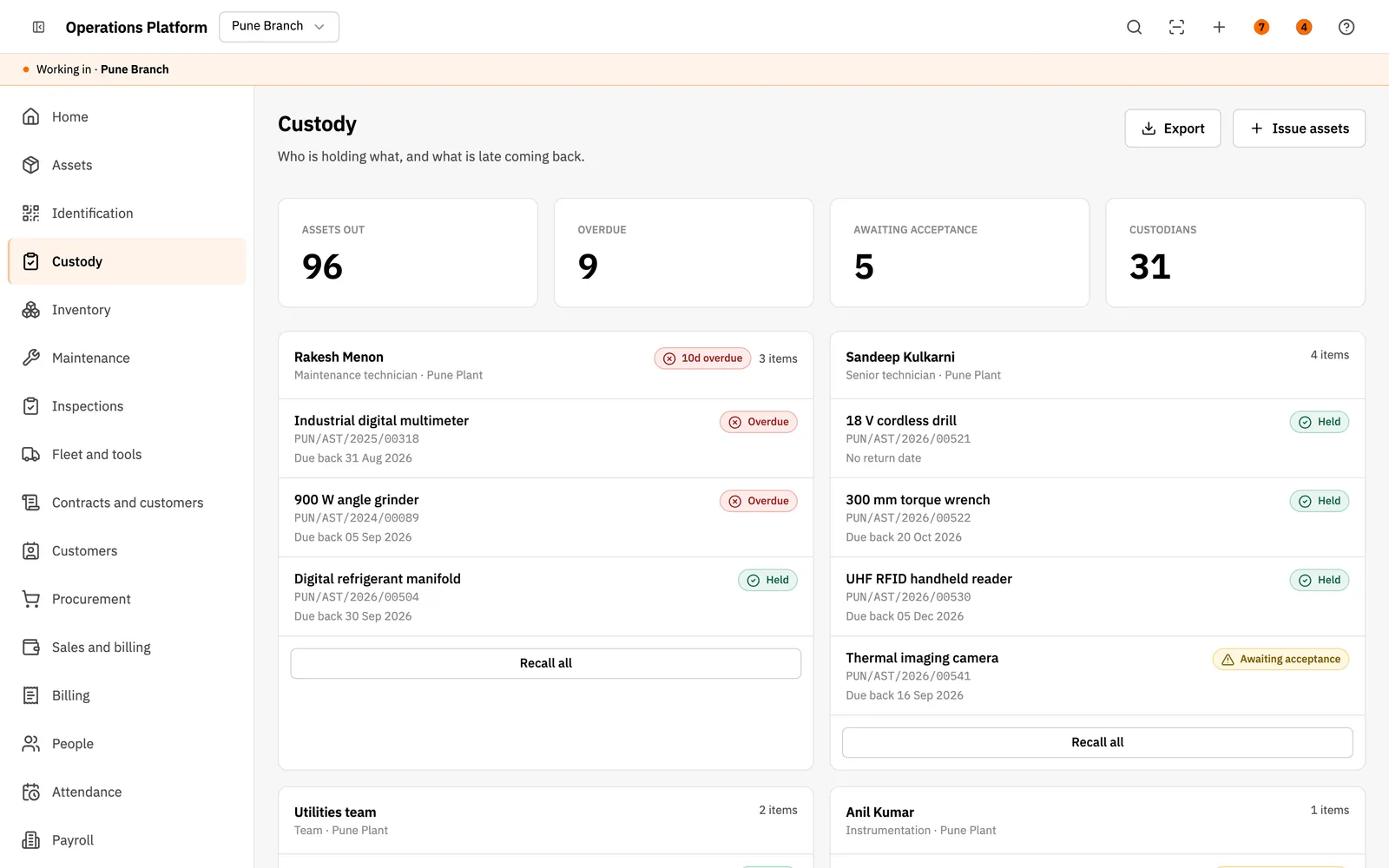
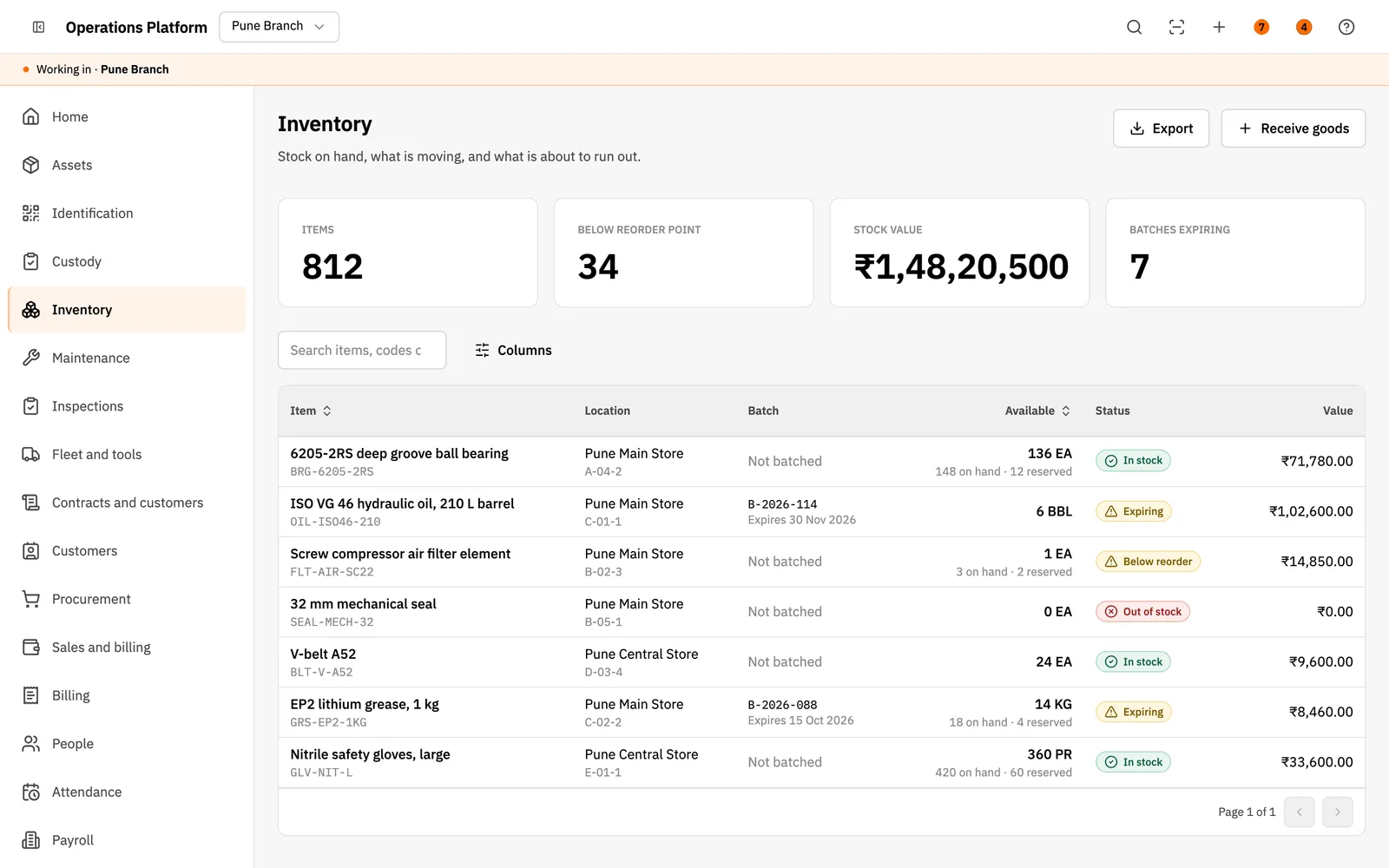
The Universal Platform is the S-Tech flagship. Instead of a fixed product for one industry, it is a configurable core: your legal entities, branches and sites, your own asset classes with their own fields, and the modules the organisation actually uses, switched on per customer. Assets are identified by UHF RFID, NFC, QR or barcode tags and every read is logged against the asset. Around that sit custody, stores, maintenance work orders with SLA clocks, inspections, fleet and tools, contracts and SLAs, sales and billing, and approval workflows. It carries no brand of its own, so it goes out under your name, and each organisation's data sits in its own database.
Why this exists
What it fixes
These are the problems clients describe to us before they buy. If none of them sounds like your week, this may not be the right product — tell us and we will point you at a better one.
What we hear
The organisation's process does not match any off-the-shelf product, so it ends up with five tools and a lot of Excel between them.
Asset tracking is treated as a separate project from operations, so the asset data is accurate but nobody uses it to make decisions.
Nobody can say who is holding a tool, which machine is overdue for service or which spare is about to run out without phoning somebody.
Different branches define the same thing differently, so there is no single number for management.
What is inside
12 modules
Every deployment turns on the modules you need. Nothing here is a separate purchase unless the plan says so.
Organisation & branches
Legal entities, branches, sites, buildings, floors and zones, with users and roles scoped to the branch they work in. Each branch sees its own data; head office sees all of it.
Asset register
Asset classes with their own custom fields, useful life and depreciation method, a register with location, custodian, next service and book value, a full timeline per asset, bulk import and export, and a data-quality check.
Identification
UHF RFID, NFC, QR and barcode tags: tag batches, encoding profiles, label templates and print jobs, mapping tags to assets, and a log of every read with unknown tags flagged.
Custody & movement
Handover with acceptance, returns, transfers between sites, gate passes, lost-asset reports, disposals and a movement history, with overdue returns flagged against the person holding the item.
Inventory & stores
Items, warehouses and bins, goods receipt, issues, transfers, adjustments, reservations, batches with expiry, re-order points, cycle counts and stock valuation.
Maintenance
Preventive plans and schedules, meter readings, breakdown work orders, dispatch to technicians, tasks, parts, labour and downtime, SLA clocks, failure analysis, vendor work and cost per asset.
Inspections & compliance
Versioned checklist templates assigned to assets, scheduled runs, corrective actions, certificates with expiry and a compliance view per site.
Fleet & tools
Vehicles and drivers, trips, fuel, defects and document compliance, plus a tool crib with issue and return, PPE and calibration due dates.
Contracts & SLA
Customers, service contracts and packages, SLA policies with holiday calendars, coverage checks, entitlement usage and renewals.
Sales & billing
Price lists and tax profiles, quotations, orders, deliveries, invoices, payments, credit notes, receivables with credit checks, and a POS counter.
Procurement & people
Purchase requests, orders, goods receipt, three-way invoice match and vendor scoring; an employee directory with onboarding, documents, skills and exits; attendance rules for shifts, rosters, leave and overtime.
Workflow & approvals
Approval workflows defined per process, with delegation, escalation, a simulator to test a workflow before it goes live, and an inbox of what is waiting on whom.
The RFID difference
What RFID adds over manual and barcode
Barcode and manual entry still work everywhere in this product. This is what changes when you add RFID on top.
- Every tag read lands in one log against the asset, so location, custody and audit all work from the same evidence instead of from what someone typed.
- UHF RFID, NFC, QR and barcode sit side by side, so high-value assets can carry RFID while consumables keep a printed barcode.
- Tags arrive in registered batches with their own encoding profile, so a tag that does not belong to you is flagged as unknown the first time it is read.
Deployment
Cloud, your server, or no internet at all
The same software either way. This is a deployment choice, not a different edition with fewer features.
Cloud
Hosted and managed. Nothing to install, live in days.
Self-hosted
On your own server, inside your building. You own the database.
Runs on
- Web (desktop, tablet and mobile browsers)
Integrates with
- REST API documented with OpenAPI
- Bulk import and export of assets
- Email through SMTP, Amazon SES or Resend
- S3-compatible storage such as Cloudflare R2 or MinIO
- A dedicated MongoDB cluster per organisation when required
Who it is for
- Factories, plants and infrastructure operators
- Facility management and industrial service companies
- Multi-branch organisations needing one platform
- Organisations that resell the platform under their own brand
- Anyone whose requirement does not fit a ready product
How it is sold
Plan tiers
Actual pricing depends on modules, users, sites and whether you host it yourself, so it is quoted. These tiers tell you where you would sit.
Core
Organisation set-up, asset register, identification, custody and stores for one legal entity.
Get a priceOperations
Core plus maintenance, inspections, fleet and tools, and approval workflows.
Get a priceEnterprise
Every module, multiple legal entities and branches, contracts and billing, white-label and a dedicated database.
Get a priceEvery S-Tech product
The same nine promises, on all 22 products
These are not per-product features. They apply to everything we build, and they are the reason our software works on sites where other systems do not.
RFID-first
Every product is built around RFID speed and modern technology from the start, not bolted on afterwards.
Any RFID hardware
Ready to configure with any make of RFID hardware. Barcode, QR code and traditional manual methods work by default.
Runs anywhere
Web, Windows, macOS, Linux, Ubuntu, Unix and Android. Your team uses the machine it already has.
Online or offline
Works fully online in the cloud, or fully offline on a local server, and syncs when a connection returns.
Self-hosted option
Host it on your own server and keep the data inside your building. No dependence on our infrastructure.
White-label
Available under your own brand — logo, colours, product name and domain.
Customisable
Every deployment is unique. Modules, fields, forms, reports and workflows are changed to fit your process.
Performance & reliability
Built for speed and uptime under real load, on real hardware, in places with unreliable power and network.
Secure by design
Encrypted data, role-based access, full audit trail and scheduled backups. You own the data.
A note on wording: where we say "fully offline" we mean the system runs on a local server on your own network with no internet connection, and syncs when one returns. Where we say "secure" we mean encrypted data, role-based access, a full audit trail and backups you control. We would rather be specific than round it up to 100%.
Questions
Before you ask us
The things buyers actually check. If your question is not here, ask it — we answer honestly, including when the answer is no.
How is this different from your industry products?
The industry products are ready to run with the process already built in. The Universal Platform is configured to your organisation: your entities and branches, your asset classes and fields, and only the modules you switch on. If your operation looks like a standard warehouse, buy WMS. If it does not look like anything on the list, this is what fits.
Can it carry our own brand?
Yes. The platform has no brand of its own. Name, logo and colours are set per organisation, and a provider console manages each customer's plan and modules.
Is our data kept apart from other customers?
Yes. Each organisation has its own database, either on the shared cluster or on a dedicated MongoDB cluster of its own, and every list is filtered to the branches a user is allowed to see.
Which languages does it support?
English, Hindi and Marathi today. Every screen reads its text from translation files, so further Indian languages are added without changing the screens.
Can we start small?
Yes, and we recommend it. Modules are switched on per organisation, so most deployments start with the asset register and tagging at one branch, prove the data, then add maintenance, stores and the rest.
Related products and solutions
Software
Warehouse Management System
Inbound to dispatch, counted by RFID instead of by hand
Read moreSoftware
Returnable Pallet & Asset Tracker
Every returnable box counted out and back at the dock
Read moreSoftware
Corporate ERP
HR, accounts and projects in one platform
Read moreSoftware
HRMS
Attendance, leave and payroll that agree with each other
Read moreSolution
Asset Management
Know what you own, where it is and what condition it is in — verified by a walk-through, not a spreadsheet.
Read moreSolution
Factory Automation
Track work in progress through the line automatically, with traceability from raw material to finished goods.
Read moreSolution
Vehicle Management
Vehicles identified as they approach, gates that open without a guard, and a complete movement record.
Read moreSolution
Returnable Assets & Pallets
A returnable fleet you can actually account for, with the loss visible and attributable.
Read moreSee Universal Platform on your own data
A demo runs on your process, not a canned dataset. Bring a real scenario and we will show you how it handles it — including the parts it does not.
Or call +91 97305 32888 — Monday to Saturday, 9:30 am to 6:30 pm.