
Retail & Hospitality · Software
Hotel & Restaurant Management System
Take the order at the table, print it in the right kitchen, bill it with a gapless GST number and close the day with a Z-report that adds up, even when the wifi drops mid-service.

Inside the product
Real screens
Shown on demo data. Click any screen to see it full size.
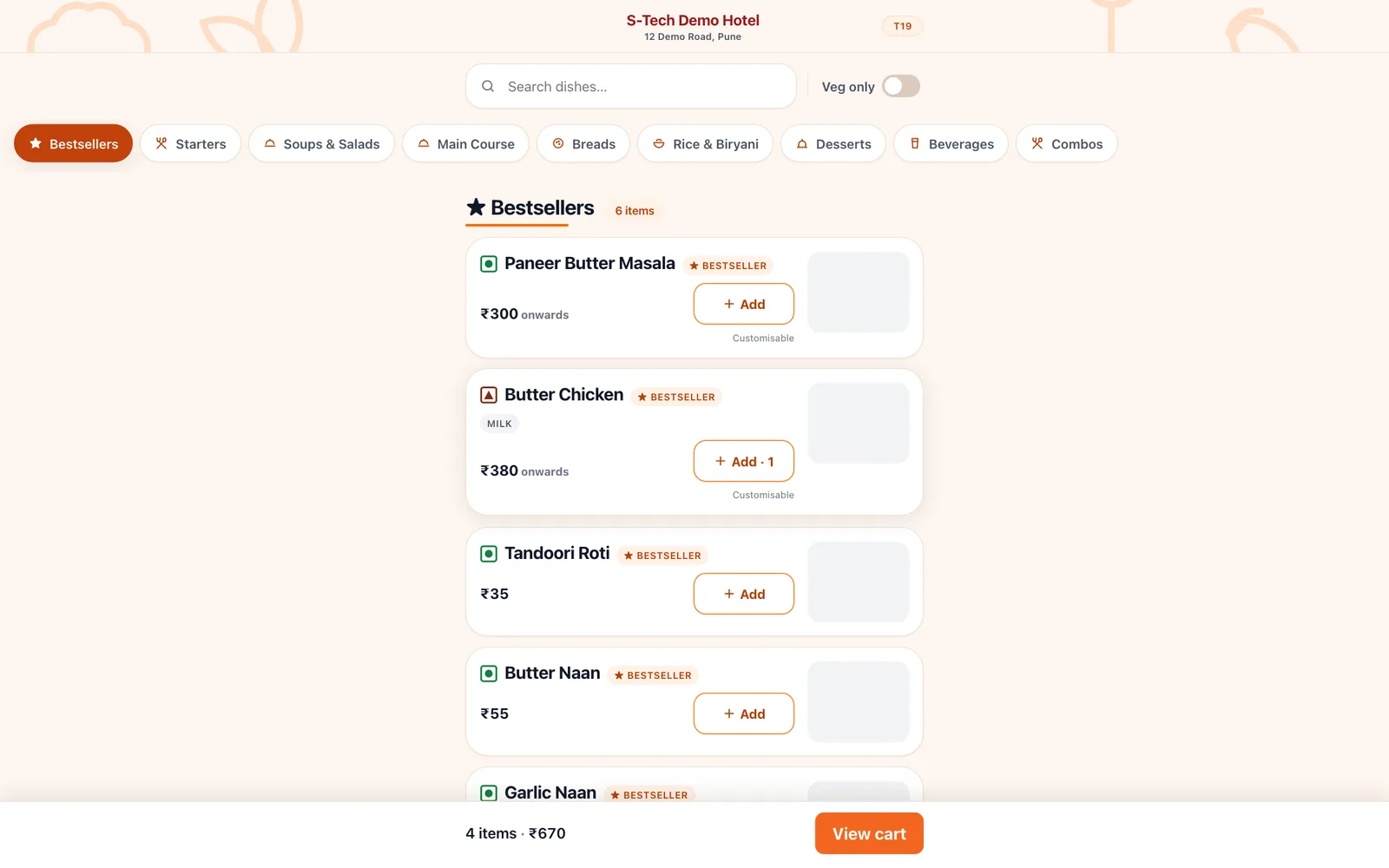
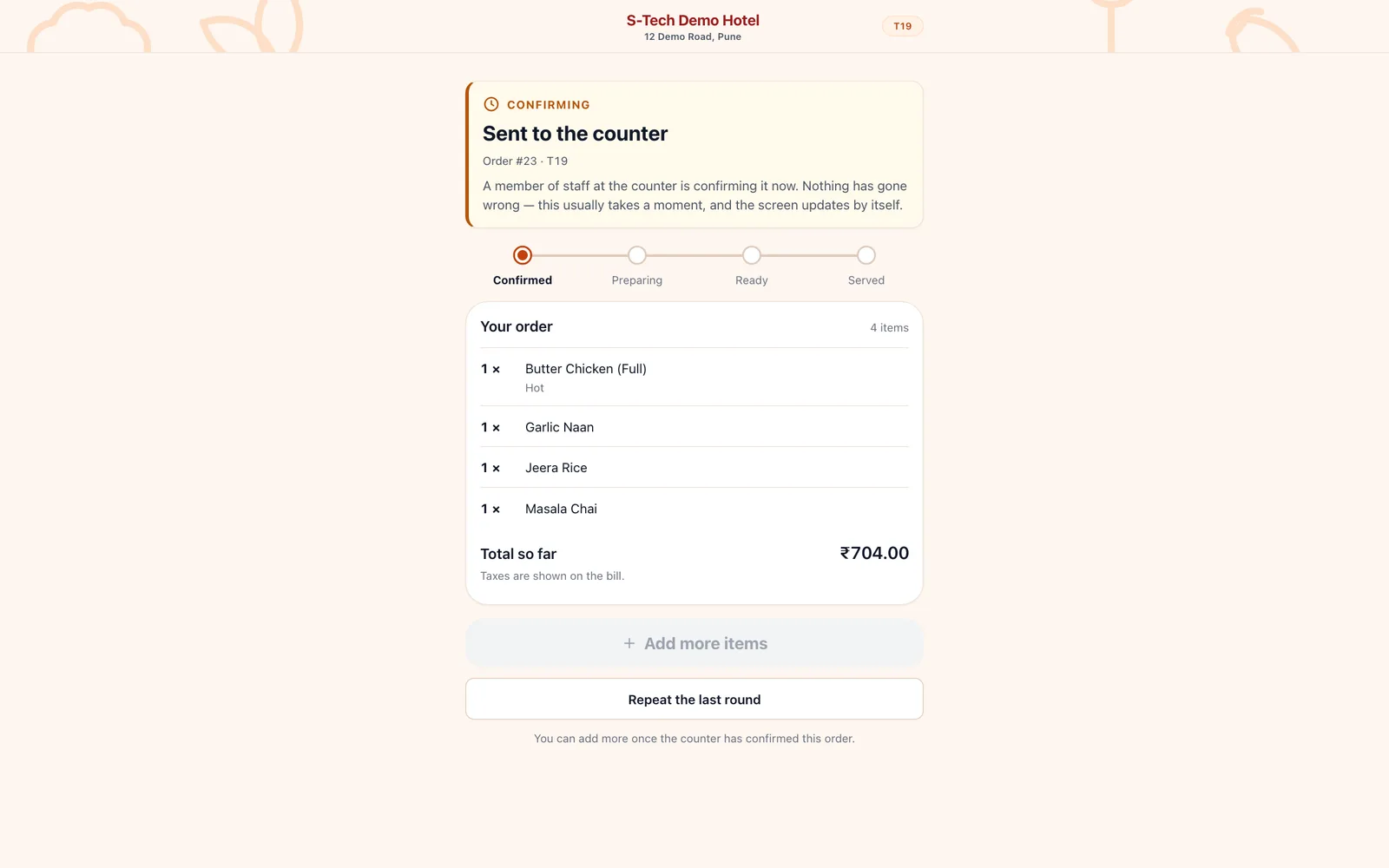
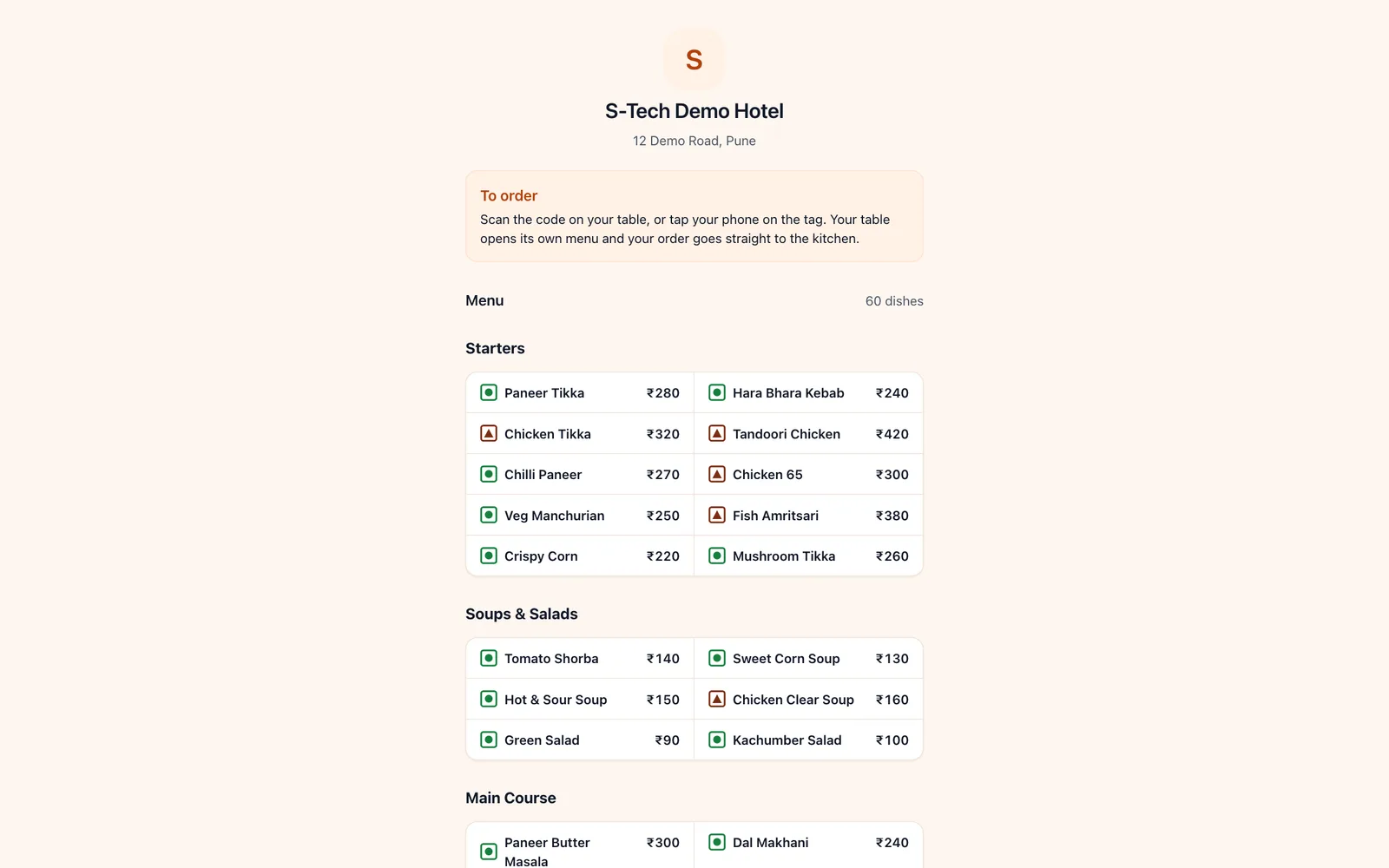
S-Tech Hotel & Restaurant Management System runs the restaurant side of a hotel or a standalone restaurant. One Android and iOS app opens as the admin, waiter, kitchen or counter screen depending on who signs in. Waiters order from a table map, each line prints at its own kitchen, bar or counter station, and the counter prints the bill, takes cash, card or UPI and frees the table. Guests can also scan a QR code or tap an NFC tag on the table to order from their phone, and every such order waits for the counter to accept it. Stock, recipes, 24 report types and the X and Z day-end reports sit behind it. Each hotel has its own database, and a vendor console creates hotels, sets licences and builds the floor plan and menu before go-live.
4
Role screens in one Android and iOS app
24
Report types, exportable to CSV and PDF
1 per hotel
Database, never shared with another hotel
Why this exists
What it fixes
These are the problems clients describe to us before they buy. If none of them sounds like your week, this may not be the right product — tell us and we will point you at a better one.
What we hear
Orders written on chits or shouted to the kitchen get lost, and the bill rarely matches what was actually served.
When the internet drops, a cloud POS stops taking orders in the middle of a busy service.
Gaps in the bill series, a service charge added by default or the wrong GST document cause trouble when returns are filed.
The owner only finds out about voids, discounts, free meals and stock running out at the end of the month.
What is inside
12 modules
Every deployment turns on the modules you need. Nothing here is a separate purchase unless the plan says so.
Waiter ordering
Table map grouped by area, covers and a menu with half and full portions, spice levels, add-ons and notes. A second round on the same table sends a follow-up ticket with only the new lines. Parcel orders are taken without a table.
Kitchen tickets and stations
Each line is routed to its kitchen, bar, dessert or counter station, so a counter item never appears on a kitchen ticket. The kitchen screen shows tickets by age, and a line voided after preparation prints a cancellation ticket and is posted to wastage.
Counter billing and payment
Bill a table or a parcel order, take cash, card, UPI, wallet or credit, split between tenders, and settle to free the table. Discounts within each role's limit with a reason, no-charge bills for staff meals and management, void approvals, reprints and a cash drawer.
GST billing
Bill numbers are allocated on the server, one series per channel, never reused and never deleted; a cancelled bill keeps its number. Tax invoice or bill of supply for 5 % GST, 18 % GST, composition or unregistered outlets, HSN summary and credit notes. Service charge is off by default and never added automatically.
Guest QR and NFC ordering
A page for every table on the hotel's own web address. The guest gives a name and mobile number with consent, searches or filters veg only, customises dishes and places the order, which waits for the counter to accept it and then shows live status. A location check can warn or block orders placed from outside the restaurant.
Thermal printing
ESC/POS printers on the LAN or over Android Bluetooth, 58 mm or 80 mm paper, separate KOT and bill printers. A print queue with retry and a print-problems screen, and Marathi or Hindi dish names printed exactly as written on the menu.
Works through a network drop
The app saves each order and its outgoing queue entry together on the device, then sends them when the network returns without creating duplicates. The kitchen ticket still prints directly when the server cannot be reached, and a bill printed offline is marked provisional and numbered on sync.
Menu, tables and floor plan
Categories, dishes with dine-in and parcel prices, portions, modifier groups, offers, dish photos and an out-of-stock switch. Areas and tables added in a run with display names, a drawn floor plan, and printable QR labels and NFC tags for every table.
Inventory and recipes
Stock items with EAN and UPC barcodes, read by a USB or Bluetooth scanner at the counter. Stock in, purchases, suppliers, wastage and recipes that consume stock as dishes sell. Stock cannot silently go below zero, and low stock appears on the admin home.
Reports and day end
X and Z reports that reconcile to the paisa, and 24 report types: hourly and channel sales, payment split, item and category sales, discounts, no-charge and void registers, tax and HSN, stock on hand, consumption variance, sales by staff and shift log. Export to CSV or PDF.
Staff, devices and security
Admin, manager, waiter, kitchen and counter roles with their own permissions. Each tablet or phone is enrolled and can be revoked, staff sign in with an mPIN that locks after five failed attempts, and every sensitive action is written to an audit log that cannot be deleted.
Vendor console
Create a hotel in a five-step wizard, paste its own MongoDB connection string and validate it, provision it and issue the admin login. Set licences from trial to read-only, suspend or resume a hotel, build its floor plan and import its menu from CSV before go-live, and raise the vendor's own licence invoices.
The RFID difference
What RFID adds over manual and barcode
Barcode and manual entry still work everywhere in this product. This is what changes when you add RFID on top.
- Each table can carry an NFC tag (NTAG213, 215 or 216) next to its printed QR code, so a guest taps a phone on the tag and that table's own menu opens.
- Tags are written from the admin app, and every table address is unguessable, so a guest at one table cannot place an order against another.
Deployment
Cloud, your server, or no internet at all
The same software either way. This is a deployment choice, not a different edition with fewer features.
Cloud
Hosted and managed. Nothing to install, live in days.
Runs on
- Android tablets and phones (staff app)
- iOS (staff app)
- Web (guest ordering page, hotel menu page, admin home and vendor console)
- Linux server (API)
Integrates with
- ESC/POS thermal printers over LAN and Android Bluetooth
- USB and Bluetooth keyboard-wedge barcode scanners
- NFC and QR table tags with printable label sheets
- Zomato and Swiggy order intake by signed webhook
- MongoDB database per hotel
- CSV and PDF report export
Who it is for
- Restaurants inside hotels and lodges
- Family restaurants and dhabas with table service and parcel orders
- Restaurants that want guests to order from the table by QR or NFC
- Vendors running a POS for several hotels from one console
Every S-Tech product
The same nine promises, on all 22 products
These are not per-product features. They apply to everything we build, and they are the reason our software works on sites where other systems do not.
RFID-first
Every product is built around RFID speed and modern technology from the start, not bolted on afterwards.
Any RFID hardware
Ready to configure with any make of RFID hardware. Barcode, QR code and traditional manual methods work by default.
Runs anywhere
Web, Windows, macOS, Linux, Ubuntu, Unix and Android. Your team uses the machine it already has.
Online or offline
Works fully online in the cloud, or fully offline on a local server, and syncs when a connection returns.
Self-hosted option
Host it on your own server and keep the data inside your building. No dependence on our infrastructure.
White-label
Available under your own brand — logo, colours, product name and domain.
Customisable
Every deployment is unique. Modules, fields, forms, reports and workflows are changed to fit your process.
Performance & reliability
Built for speed and uptime under real load, on real hardware, in places with unreliable power and network.
Secure by design
Encrypted data, role-based access, full audit trail and scheduled backups. You own the data.
A note on wording: where we say "fully offline" we mean the system runs on a local server on your own network with no internet connection, and syncs when one returns. Where we say "secure" we mean encrypted data, role-based access, a full audit trail and backups you control. We would rather be specific than round it up to 100%.
Questions
Before you ask us
The things buyers actually check. If your question is not here, ask it — we answer honestly, including when the answer is no.
What happens when the internet goes down during service?
The staff app keeps taking orders. Each order is saved on the device and sent when the connection returns, with keys that stop it being created twice, and the kitchen ticket still prints directly. A bill printed offline is marked provisional and receives its number when it syncs.
Can guests order from their own phone?
Yes. Each table has a QR code and can also have an NFC tag. The guest opens that table's menu, places the order and sees its status; nothing reaches the kitchen until the counter accepts it, and orders from outside the restaurant can be warned or blocked by location.
Are the bills GST compliant?
Bill numbers come from the server in an unbroken series per channel, and cancelled bills keep their number. The outlet is set up as 5 % GST, 18 % GST, composition or unregistered, which decides whether a tax invoice or a bill of supply is printed. Service charge is off unless the outlet turns it on.
Where is our data kept?
Each hotel has its own MongoDB database. Its connection string is stored encrypted in the vendor console and never written to a log, and one hotel's data never mixes with another's.
Related products and solutions
Software
Canteen Management System
One face scan, one meal, recorded by time slot
Read moreSoftware
Accounting & Tax Filing Software
Books, invoicing and GST that stay ready to file
Read moreSoftware
HRMS
Attendance, leave and payroll that agree with each other
Read moreSolution
Retail Management
Stock that is actually accurate on the shop floor, faster checkout, and fewer items walking out unbilled.
Read moreSee Hotel POS on your own data
A demo runs on your process, not a canned dataset. Bring a real scenario and we will show you how it handles it — including the parts it does not.
Or call +91 97305 32888 — Monday to Saturday, 9:30 am to 6:30 pm.