
Business & Back-office · Software
Canteen Management System
Face-scan canteen counters that record every meal against the person and the time slot — regular or extra, guest token codes, several counters and reports for HR, accounts and admin.

Inside the product
Real screens
Shown on demo data. Click any screen to see it full size.
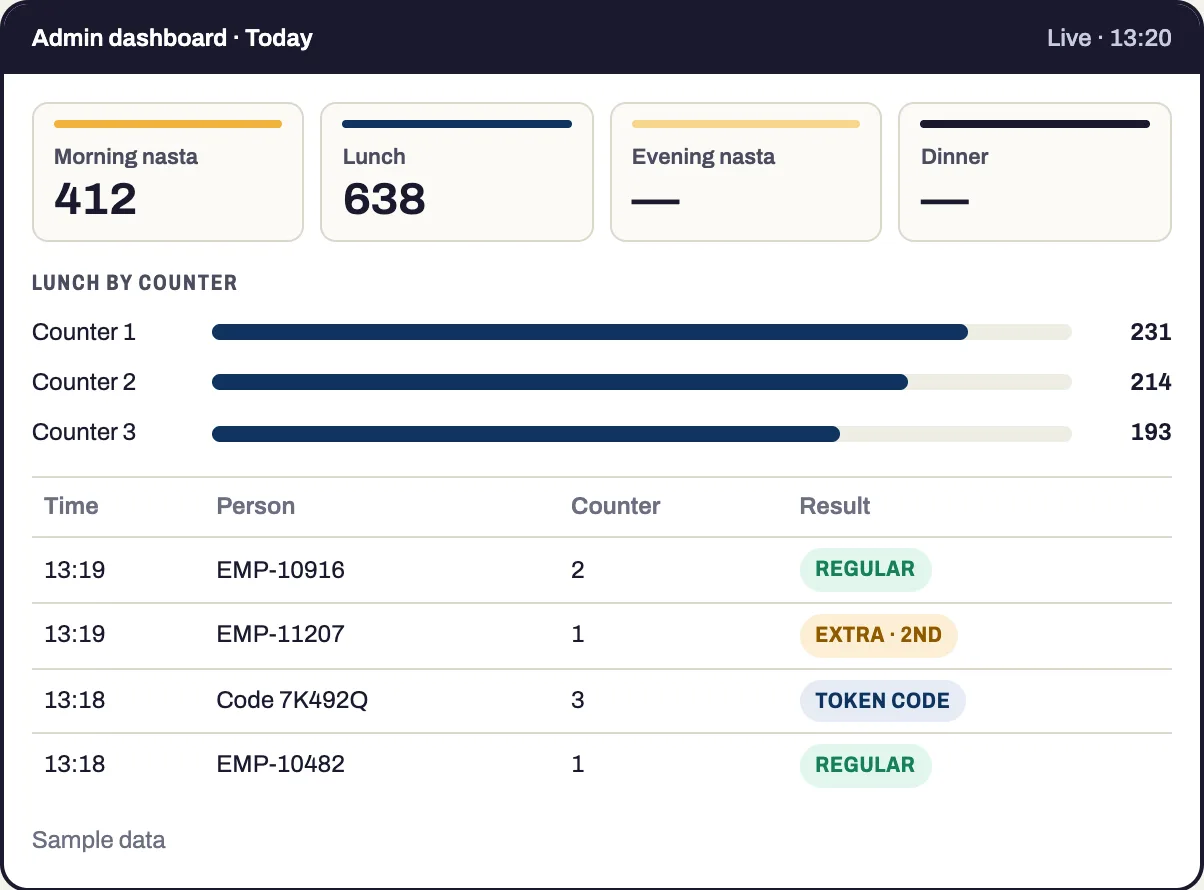
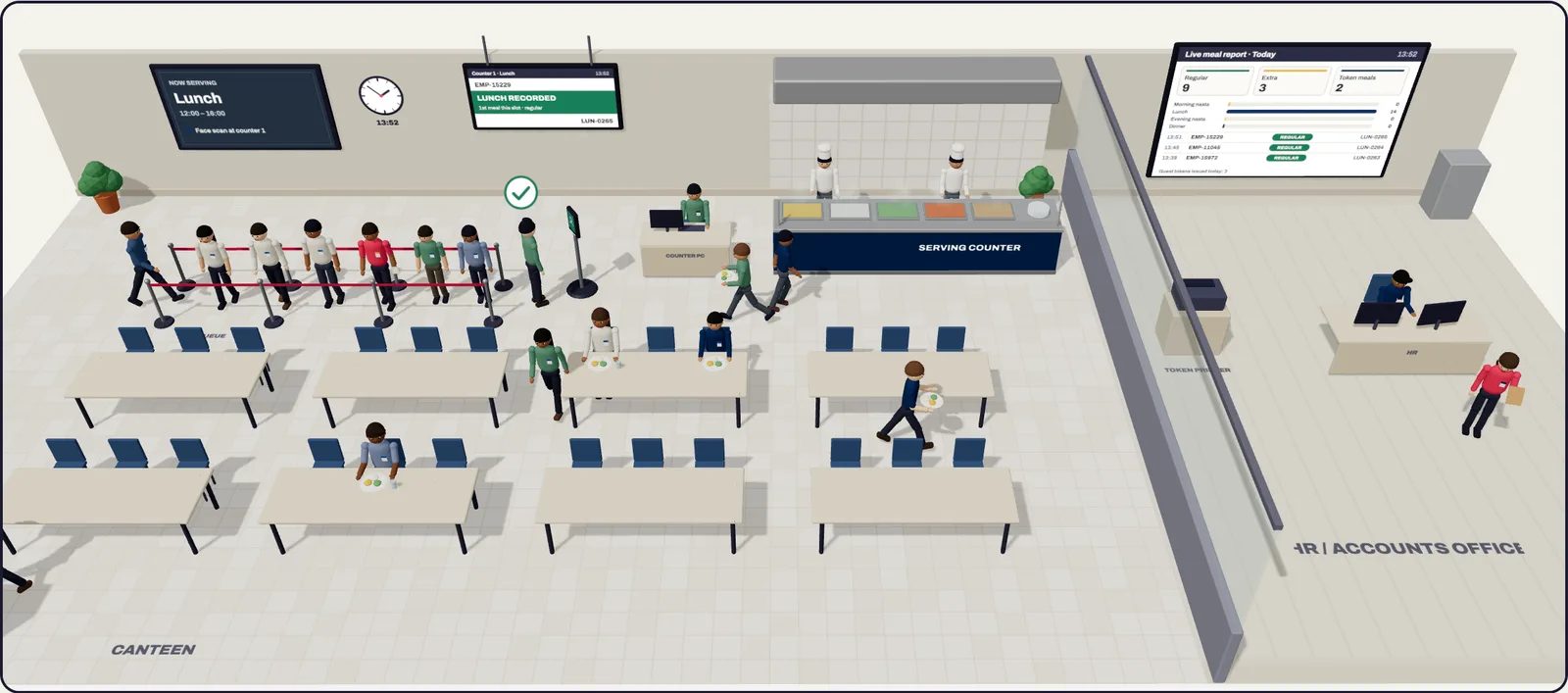
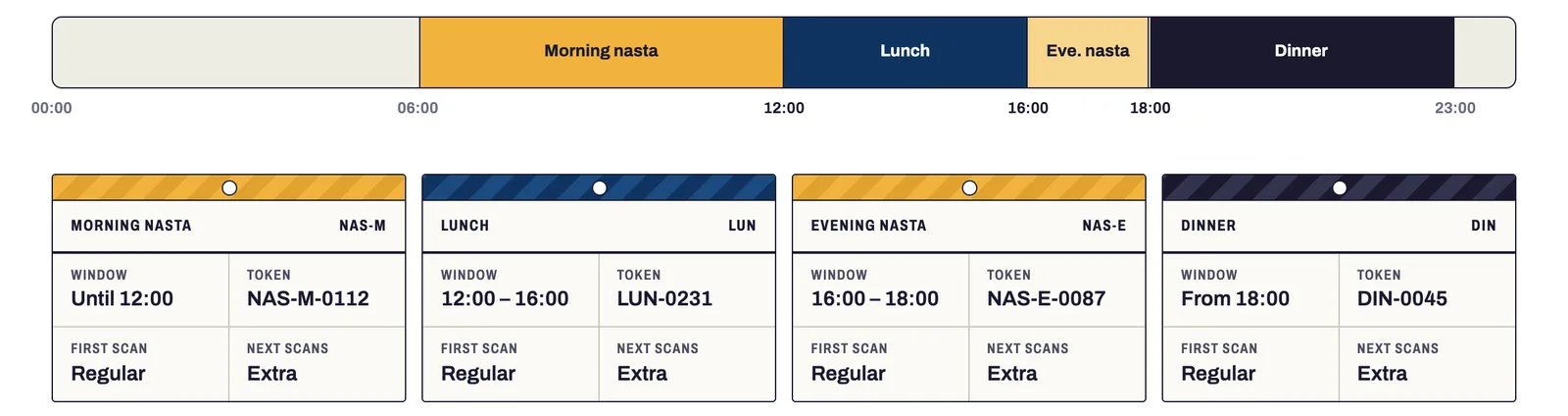
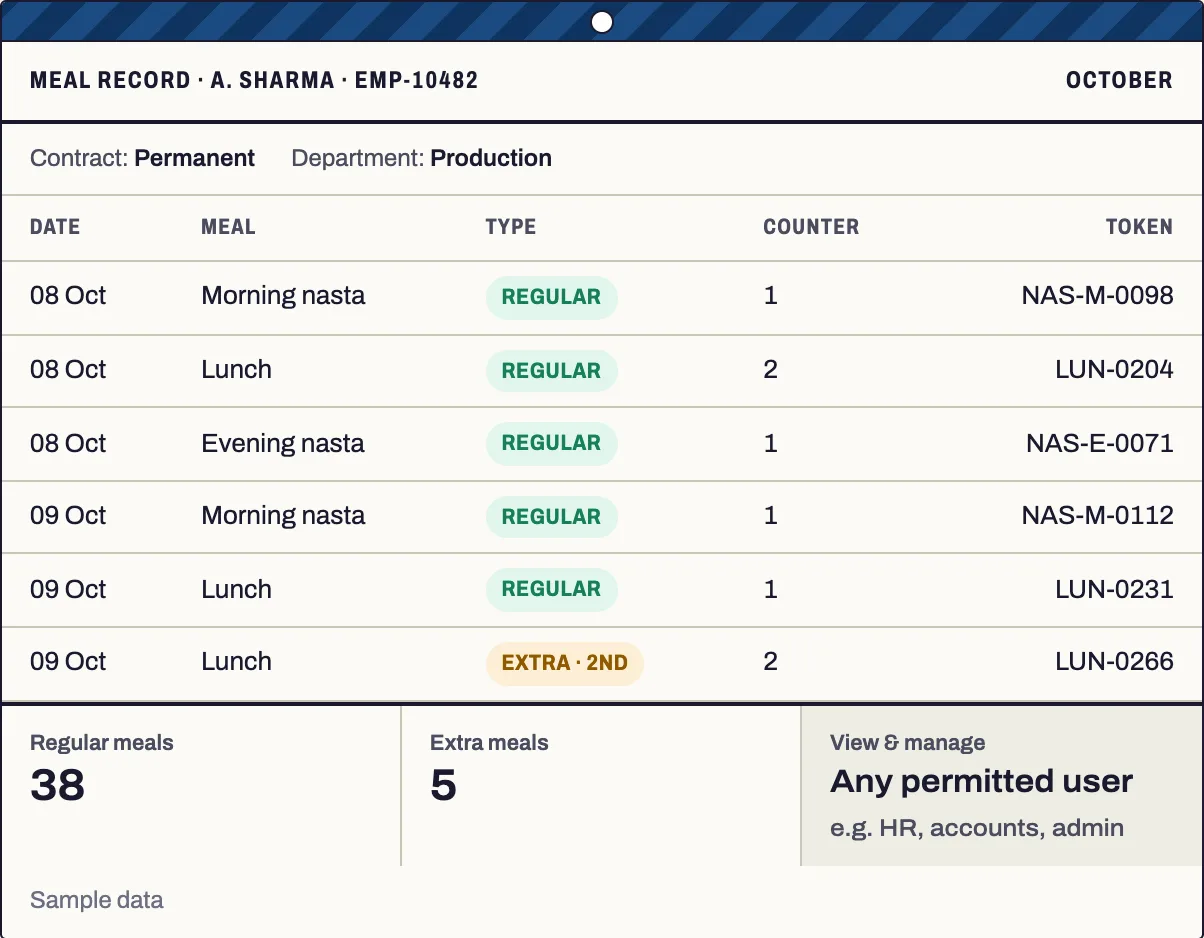
S-Tech Canteen Management runs the canteen counter on face recognition terminals, including ones a site already has installed. A person looks at the terminal, their profile appears on the counter screen, and the meal for the current time slot is recorded straight away. The first meal in a slot is recorded as regular and any further scan as extra, so the counter never has to decide. Visitors and one-off cases are served against a token code entered by canteen staff. Every record carries the person's company or contractor, contract type and department, so HR, accounts and admin see the full picture and can act on it.
Thousands
Scans and serves handled a day
Any number
Of counters on one set of records
Why this exists
What it fixes
These are the problems clients describe to us before they buy. If none of them sounds like your week, this may not be the right product — tell us and we will point you at a better one.
What we hear
Meals are not tied to a person, so a plate taken twice in the same slot goes unnoticed.
Nobody can say exactly how many plates each meal, counter or day actually served.
Visitors, contractors and one-off cases are fed without any record behind the meal.
People from different companies and contracts share one canteen, and the records cannot be split by company, contractor or department.
What is inside
11 modules
Every deployment turns on the modules you need. Nothing here is a separate purchase unless the plan says so.
Face-scan counter app
The person scans their face and the counter screen shows their name, photo, ID and department with the meal status and token number. No manual entry.
Meals by time slot
The scan time decides the meal. Slot names, start and end times and token prefixes are set from the admin dashboard and can be changed at any time.
Regular & extra meals
The first meal in a slot is regular; another scan in the same slot is extra, and the screen says how many times and when it was taken.
Guest token codes
Staff with access, such as admin or HR, issue codes for visitors and contractors. Only canteen staff enter them on the counter PC, and every use is logged.
Meal token numbers
Every serve gets a running token number in its meal category, so plates are counted per meal, per counter and per day.
People, companies & contracts
Employees and contract staff with their company or contractor, contract type, department and ID, so every record can be grouped by them.
Multiple counters
Any number of counters run at the same time, each linked to its own terminal and operations PC, sharing one set of records.
Roles & permissions
Role-based access for HR, accounts, admin and others. Permitted users view and manage every meal and can place an extra meal for a person.
Live admin dashboard
Scans and meals across all counters as they happen, with today's count for each slot and each counter.
Reports & export
Daily meals by slot, monthly per employee, department, company or contractor, contract type, counter, extra meals and token-code meals, with export.
Terminal integration
Connects to face recognition terminals, such as eSSL, through the manufacturer's SDK and receives each face match in real time.
The RFID difference
What RFID adds over manual and barcode
Barcode and manual entry still work everywhere in this product. This is what changes when you add RFID on top.
- Identification is by face only, so there is nothing to carry, swipe or lose at the counter.
- Every serve is tied to one person and one slot, so nothing is shared or repeated unnoticed.
- It works on face recognition terminals already installed at the counter, so the canteen does not need new identification hardware.
Deployment
Cloud, your server, or no internet at all
The same software either way. This is a deployment choice, not a different edition with fewer features.
Self-hosted
On your own server, inside your building. You own the database.
Runs on
- Operations PC at site (counter app and token entry)
- Admin dashboard for permitted users
Integrates with
- Face recognition terminals through the manufacturer's SDK (e.g. eSSL)
- S-Tech Smart Gate & Visitor Management — guest meals against a visit, where required
- Report export for HR and accounts
Who it is for
- Factories and manufacturing plants with a staff canteen
- Sites where permanent staff and contract workers from several companies share one canteen
- Canteens running several counters at once
- HR, accounts and admin teams that need meal records per person
How it is sold
Plan tiers
Actual pricing depends on modules, users, sites and whether you host it yourself, so it is quoted. These tiers tell you where you would sit.
Counter
Face-scan counter app, meals by time slot, regular and extra records, and daily reports.
Get a priceComplete
Everything in Counter plus multiple counters, guest token codes, meal token numbers, company and contract details, roles and the live admin dashboard.
Get a pricePlatform
Everything in Complete plus a shared people master, login and reports with other S-Tech systems such as gate and visitor management.
Get a priceEvery S-Tech product
The same nine promises, on all 22 products
These are not per-product features. They apply to everything we build, and they are the reason our software works on sites where other systems do not.
RFID-first
Every product is built around RFID speed and modern technology from the start, not bolted on afterwards.
Any RFID hardware
Ready to configure with any make of RFID hardware. Barcode, QR code and traditional manual methods work by default.
Runs anywhere
Web, Windows, macOS, Linux, Ubuntu, Unix and Android. Your team uses the machine it already has.
Online or offline
Works fully online in the cloud, or fully offline on a local server, and syncs when a connection returns.
Self-hosted option
Host it on your own server and keep the data inside your building. No dependence on our infrastructure.
White-label
Available under your own brand — logo, colours, product name and domain.
Customisable
Every deployment is unique. Modules, fields, forms, reports and workflows are changed to fit your process.
Performance & reliability
Built for speed and uptime under real load, on real hardware, in places with unreliable power and network.
Secure by design
Encrypted data, role-based access, full audit trail and scheduled backups. You own the data.
A note on wording: where we say "fully offline" we mean the system runs on a local server on your own network with no internet connection, and syncs when one returns. Where we say "secure" we mean encrypted data, role-based access, a full audit trail and backups you control. We would rather be specific than round it up to 100%.
Questions
Before you ask us
The things buyers actually check. If your question is not here, ask it — we answer honestly, including when the answer is no.
Do we need new face machines?
Not if face recognition terminals are already installed at the counter. The software connects to them through the manufacturer's SDK, so we need SDK access for the installed model, an operations PC at site and a network between the two.
What happens when someone who is not registered scans?
The screen shows a simple "not registered" message. Anyone who will eat regularly is added by the admin on the terminal and in the canteen system; visitors and one-off cases are served with a token code entered by canteen staff.
Can we change the meal timings later?
Yes. Slot names, start and end times and token prefixes are set to your routine during setup and can be changed by the admin from the dashboard at any time.
How reliable is the face recognition?
Face matching is done by the terminal itself. Recognition depends on the machine, the quality of face enrolment and the lighting at the counter.
Related products and solutions
Software
Smart Gate & Visitor Management
Visitors, staff, vehicles and shipments on one gate register
Read moreSoftware
Smart Attendance System
Hands-free attendance that walks through the door
Read moreSoftware
HRMS
Attendance, leave and payroll that agree with each other
Read moreSoftware
AIR — Cloud RFID Inventory
Full stock audits in minutes, not days
Read moreSolution
Factory Automation
Track work in progress through the line automatically, with traceability from raw material to finished goods.
Read moreSolution
Entrance, Attendance & Access Control
One credential for the gate, the door, attendance and the canteen — with a record of everything.
Read moreSee Canteen on your own data
A demo runs on your process, not a canned dataset. Bring a real scenario and we will show you how it handles it — including the parts it does not.
Or call +91 97305 32888 — Monday to Saturday, 9:30 am to 6:30 pm.